By the Octri team · Updated
How to write API documentation: a step-by-step guide
A developer opening your API documentation does not want a tour of every endpoint. They are usually trying to accomplish one small thing, and each unanswered question delays that result. A useful documentation site teaches them how to make the first request, gives them a reference they can trust, and helps them recover when the real world stops resembling the example.
Writing API documentation becomes easier when you organize it around that journey rather than starting with a list of pages a template says you should have.
How do you write API documentation?
Choose a real task your API supports, document the path to completing it, and use that task to discover the reference material you need. For most HTTP APIs, begin with a quickstart, authentication instructions, an OpenAPI-driven reference and an errors page. Add explanations for pagination, rate limits and versions, then maintain them alongside the implementation.
The most important early test is whether a developer unfamiliar with your system can copy an example, supply their own safe credentials and recognize a successful response.
What API documentation includes
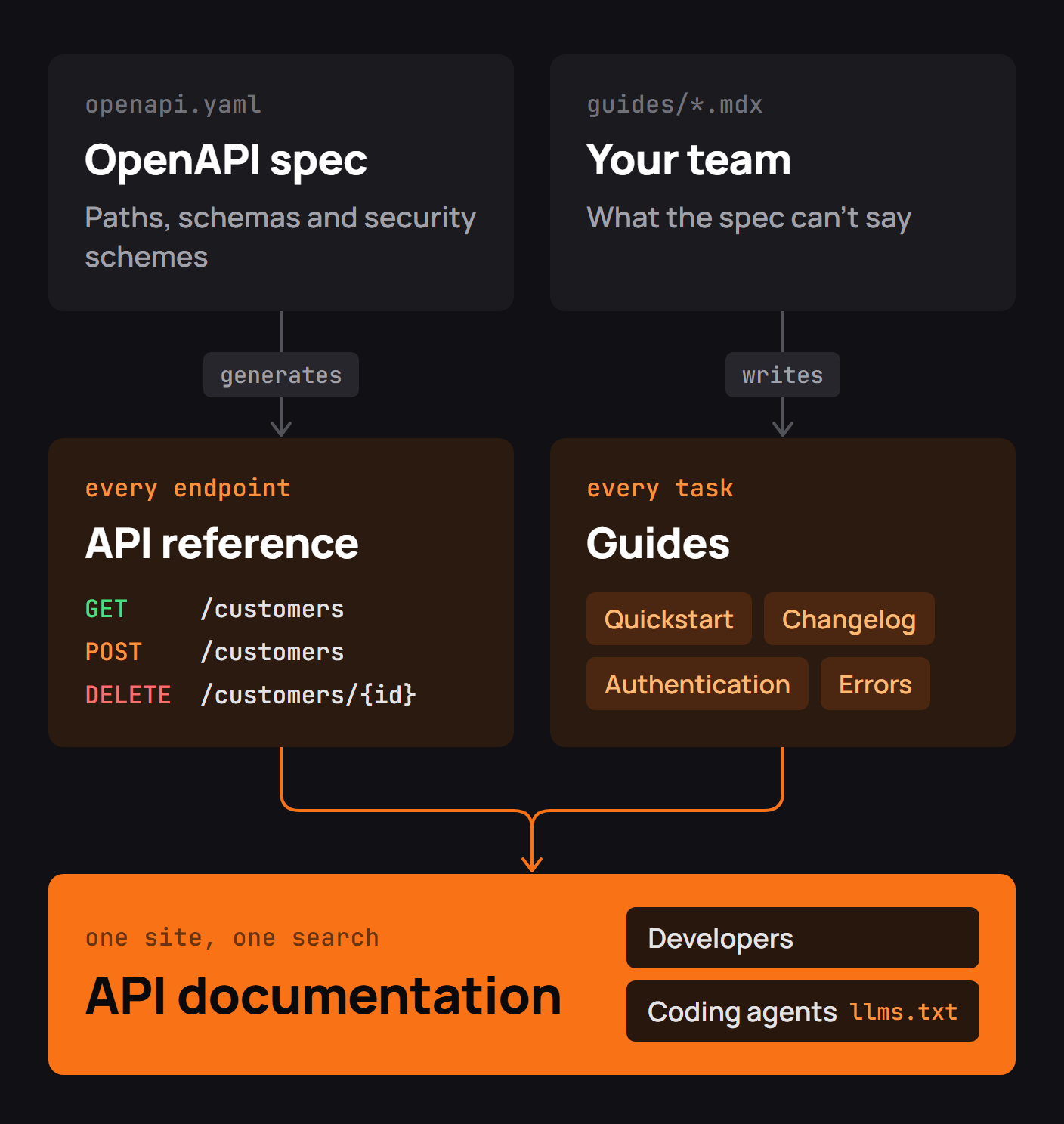
A documentation site serves several different kinds of questions. The overview helps a reader decide where to start. The quickstart gets a first result. Authentication explains credentials and scopes. The reference describes every supported endpoint and its contract. Guides explain tasks that involve several calls. Error and operations pages describe failures, retries, pagination and versioning. A changelog tells developers what changed.
You do not need a separate page for every bullet on day one. You do need to make the answers easy to find. API reference vs guides is a useful way to keep endpoint facts distinct from workflow explanations.
Know who reads it
An engineer evaluating the product wants to know how quickly an integration can begin. Someone implementing it needs exact parameters and code samples. A developer debugging a production failure wants error meanings and version changes, not another welcome page. An AI coding assistant needs the same facts in a stable, retrievable format.
A good exercise is to write down the first question each reader brings to the site, then ask which page answers it. That keeps navigation aligned with work people are actually doing rather than the internal organization of the API team.
Write the quickstart first
I tested a small version of this for this guide. I wrote a local example API with a single POST /v1/customers endpoint, a demo bearer token and a required email field. Then I deliberately sent four requests: no token, a valid token with no email, a successful customer creation, and a separate request to an endpoint the demo token could not access.
The local service responded 401, 400, 201 and 403 respectively. What surprised me was how little of that information fit in the usual quickstart sentence, “Send a POST request to create a customer.” The sentence was technically correct and almost useless as an instruction. The reader needed to know where the token came from, exactly how to pass it, the required JSON shape and what a successful result looked like.
A more useful first example looked like this in the local exercise:
curl http://127.0.0.1:8000/v1/customers \
  -X POST \
  -H 'Authorization: Bearer demo-reader' \
  -H 'Content-Type: application/json' \
-d '{"email":"ada@example.com"}'{"id":"cus_123","email":"ada@example.com"}This is an illustrative local API, not a real hosted service or a command to run against Octri. The experiment taught me to put the prerequisites and expected response directly beside the first request. A real quickstart should also show where a developer obtains their own credential, how to install the relevant SDK if one is used, and how to verify the result in the product.
Keep the first task small. The reader can learn advanced options, pagination and webhook subscriptions after they have seen one success.
Document authentication
Explain credential creation before showing a request that depends on it. Name the exact header and scheme, distinguish test from production credentials, describe token expiration and list the scopes relevant to each operation.
A page that says “authentication required” has barely started the explanation. A developer needs to know whether the API expects X-API-Key, a bearer token or an OAuth flow, and what to do when the response is 401 or 403.
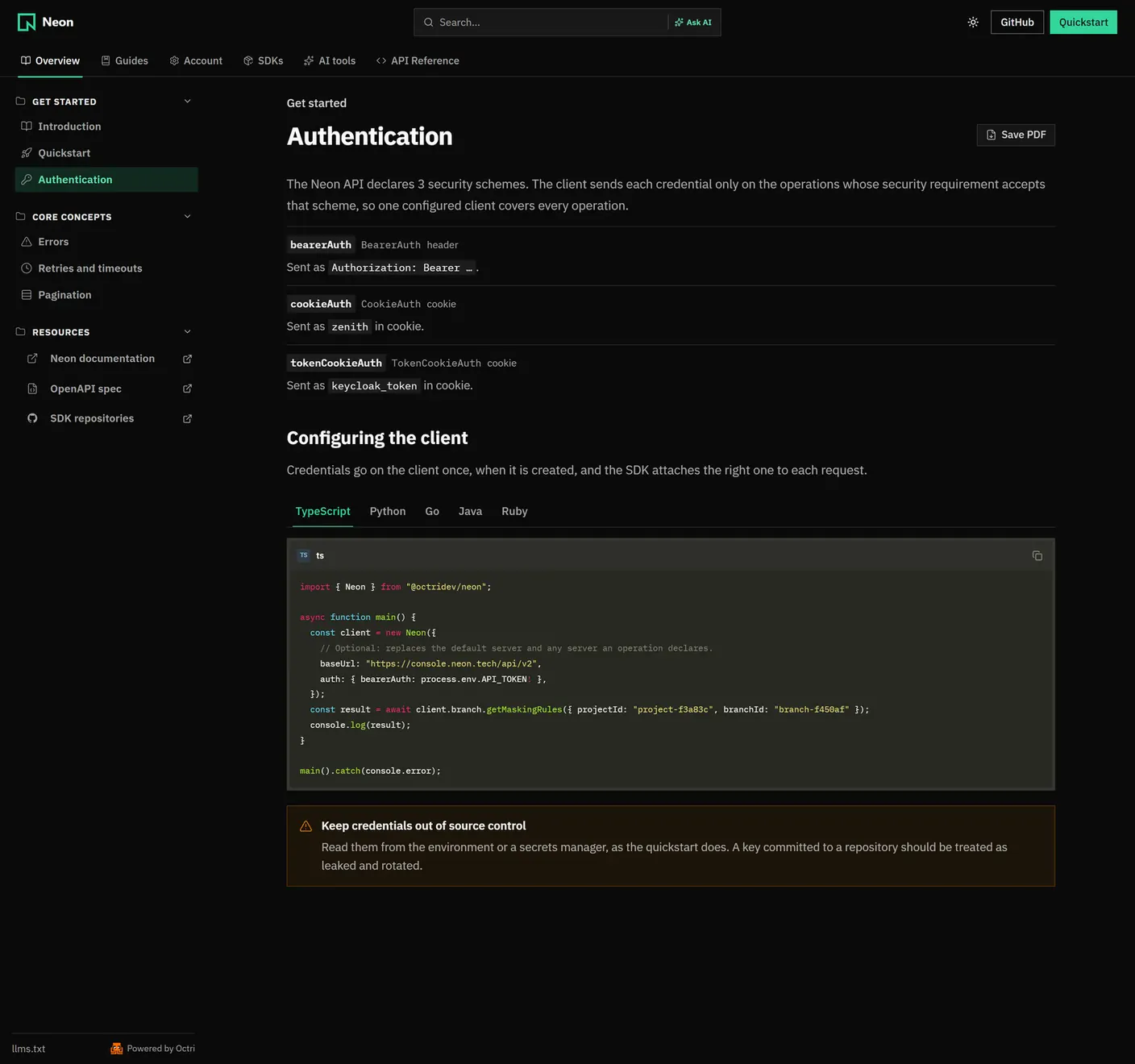
How to document API authentication covers credential lifecycle, OAuth and permission errors in detail.
Generate the API reference from OpenAPI
An OpenAPI file can define methods, paths, request bodies, schemas, authentication and responses. Use it to generate the repetitive endpoint structure rather than manually maintaining parameter tables that drift after each release.
Generation does not fix weak source material. A field described only as “status” remains unclear when rendered beautifully. Explain what each value means, whether a field is required, its default, whether omission differs from null, and what happens at boundary values. Give operations stable operationId values and realistic examples so generated SDKs and references have useful names.
Validate the OpenAPI description against the running service. A reference generated from a stale spec is consistently wrong, not consistently correct.
Write the errors page
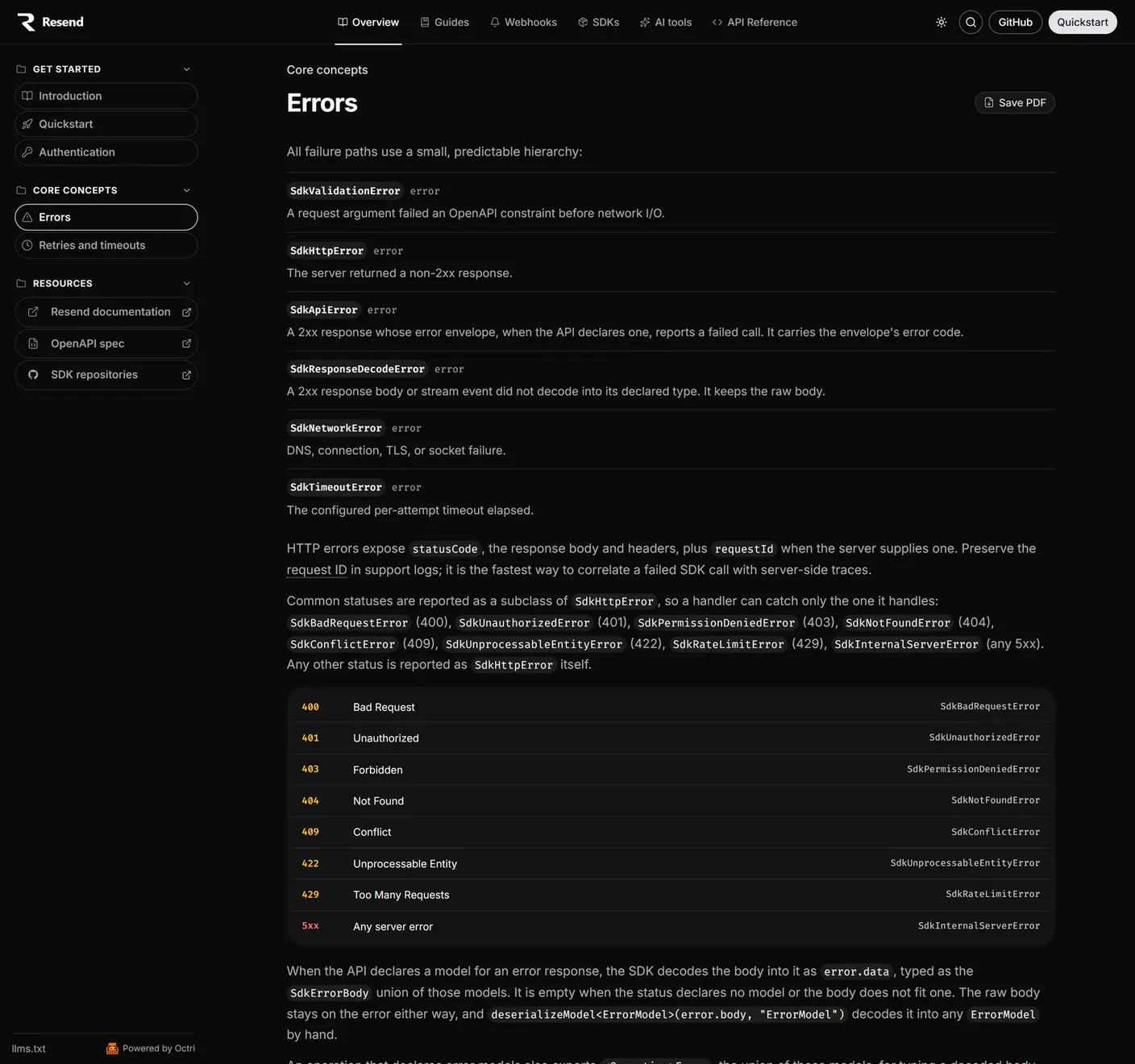
The first time a request fails, developers stop reading the quickstart and start looking for a cause. Give them an error model, a list of application error codes, the meaning of each HTTP status and whether to retry.
In my local customer exercise, a missing email produced:
{"error":"missing_field","field":"email"}That message is much more actionable than “Bad Request.” A production documentation page should go further by explaining whether the client should correct the request, refresh credentials, wait for a backoff interval or contact support with a request ID.
A table can be compact and useful:
| Response | Typical interpretation | Reader action |
|---|---|---|
400 |
Input is invalid | Correct the named field |
401 |
Credentials are missing or invalid | Supply or refresh credentials |
403 |
Caller is not permitted | Review scopes and authorization |
429 |
Too many requests | Follow the documented retry policy |
5xx |
Server-side failure | Retry safely where appropriate and escalate if persistent |
Actual semantics vary by API. Document your service's specific response body and policies rather than copying generic definitions.
Document rate limits, pagination and versioning
These topics become important as soon as the developer goes beyond one request. Explain the rate-limit window and response headers, the retry interval, whether write operations accept idempotency keys, and how to fetch the second page of a result set.
Pagination examples should show an actual continuation token or next-page parameter rather than only the first response. Versioning guidance should state how requests select a contract, which version is the default, what qualifies as breaking and when older versions retire.
If retrying a request can create duplicate side effects, say so in the same section as rate limits. An apparently helpful recommendation to retry every 500 is dangerous for non-idempotent operations without a documented protection mechanism.
Add code samples
Start with cURL because it exposes the HTTP request clearly. Then add examples in the languages your users write, using the SDK version you support and the same input values across samples. Show initialization, imports, authentication setup and the operation call; avoid snippets that work only after the reader guesses which package to install.
Ideally, run important samples in CI or at least type-check them against the published SDK. A beautifully formatted example that no longer compiles costs more time than a plain example that works.
Publish a changelog
A developer whose integration worked last week wants to know what changed, not read a marketing summary of the release. Name affected operations, describe behavioral changes, distinguish additive from breaking updates and link to a migration guide when code must change.
Write changelog entries close to the code review that introduces the behavior. The person who understands the change best is least likely to remember its subtle details months later.
Keep the docs up to date
Keep the OpenAPI source in the release process, generate the reference from it and check it against the API. Review guides with the same code changes they explain. Give every important page an owner and periodically test the first-request path from scratch.
This is where the local experiment was useful again. If I changed the demo endpoint to require a name field, the old quickstart would still look plausible. Only a test, or a reader actually following the steps, would reveal the mismatch. Maintaining API documentation covers the checks that make that detection routine.
Add WebMCP tools for browser agents
Some documentation sites can expose browser-agent tools through the emerging WebMCP proposal. Read-only functions such as searching the docs, retrieving a page and navigating to a reference entry can make an assistant's work more reliable than guessing from on-screen controls.
Treat these as an additional interface, not a replacement for good pages or a stable OpenAPI file. A browser tool for reading docs is also distinct from an MCP server authorized to call the API itself; the two need different permission boundaries.
API documentation best practices
Keep the writing close to actions. Use the same resource names in the guides and reference, define units, show responses beside requests, and make prerequisites visible before code. Separate the first successful task from advanced use cases. Link each guide step to its endpoint reference and link relevant reference pages back to explanations.
Review the output as an outsider would: search for a task, open the first result and see what information is still missing. Good documentation turns those missing assumptions into explicit instructions.
API documentation checklist
- A quickstart with prerequisites and a verified successful request.
- Authentication instructions with exact headers and scopes.
- An OpenAPI-driven reference with useful field descriptions.
- Request and response examples for supported SDK languages.
- Error codes with causes, recovery instructions and retry guidance.
- Rate limits, pagination and versions explained through real examples.
- A dated changelog and migration guides where needed.
- Searchable, linkable pages that remain useful to coding assistants.
- Contract validation and guide reviews in the release workflow.
Writing API documentation with Octri
Octri API Studio can turn an OpenAPI description into an API reference with endpoint examples and an interactive playground. Teams can write guides in visual or MDX mode, publish them beside the reference and keep the content aligned with updates to the spec. An llms.txt index and Markdown views can help AI assistants retrieve published content.
The tool can handle much of the mechanics of publishing a documentation site. The important editorial test remains the one from the small customer exercise: can someone with no prior context make a request, recognize the result, and understand what to do when it fails?