By the Octri team · Updated
API documentation examples worth learning from
A developer usually arrives at your API documentation with something half-finished. They're trying to create a customer, send a message, or understand why a request that worked yesterday now returns an error. They aren't looking for an inventory of features. They're trying to finish a job.
That is how I like to judge API documentation examples. A beautiful reference can still leave readers guessing about authentication, permissions, or the shape of a successful response. A modest page can be excellent if it gives them enough information to proceed without opening five more tabs.
The seven sites below are worth studying for different reasons. Each makes a particular part of the developer's work easier, and each suggests something concrete you can borrow for your own API documentation.
What makes good API documentation?
Start with the moment after a developer copies their first request. Do they know where to put a credential? Can they tell whether the response is correct? If the request fails, does the page say what to change?
Good API documentation makes those answers available where the reader needs them. A complete example gets someone started. A language-specific quickstart keeps them from translating a tutorial while they learn a new API. Permissions, test credentials, and version policies become important as soon as the integration moves beyond the happy path.
There is no single perfect docs layout. The useful question is whether an engineer who did not build the API can follow it through a real task without having to invent missing instructions.
Stripe: requests you can paste and run
Open Stripe's Create a customer reference. Before getting lost in the parameter descriptions, you can see the request itself: POST /v1/customers, the authentication format, a Stripe-Version header, and a name and email that look like actual customer data. The response follows immediately, with the object ID and the fields the API returns.
That arrangement matters. If the request is complete but its expected response lives elsewhere, the developer still has to guess whether the result they received is correct. If the response is shown but the authentication or version is missing, the example is difficult to reproduce. Stripe keeps those details together.
Its parameter descriptions go further than repeating the field names. For example, the balance description explains that the amount is expressed in the smallest currency unit and that negative and positive values affect future invoices differently. Those are the details that prevent an integration from appearing to work while doing the wrong thing.
When writing your own reference, start with one question: Could someone adapt this request using only the information on this page? Show the method and URL, the headers, the required fields, and a representative response. Put the subtle constraints next to the fields they govern. A playground is useful, but the underlying example should make sense even when the reader can't run it yet.
Twilio: a quickstart in every language
One weakness of API tutorials is easy to overlook: the language selector changes the code block, while the surrounding instructions still assume everybody writes JavaScript.
I tested that while reviewing Twilio's SMS quickstart. I chose Go as my route through the page, with a narrow goal: figure out what I would need to send my first SMS without translating a Node.js tutorial along the way.
The Go path gave me more than a different final snippet. It included the commands to create a Go module and install the Twilio SDK, named the environment variables for the account SID and API credentials, and showed how to run the program. The guide also explained how its trial and virtual-phone setup fit into the example.
One thing made me stop. The prerequisites included Gin and ngrok, which seemed like a lot of machinery for sending one text message. Further down, the tutorial turns to receiving messages, where a local server and a public tunnel make sense. I understood why those tools were there, but I would have found the first step faster if the send-only setup had been separated from the webhook setup. Even a good quickstart can ask the reader to carry too much context too early.
I didn't send a live message; that would have required an account and credentials. But I came away knowing which values I had to supply and which command I would run first. I hadn't needed to invent the missing half of the tutorial.
That changed the question I ask when I see a row of language tabs. It's easy to count languages. A better test is whether the whole path to a working result changes with the language: package installation, client initialization, environment setup, error handling, and execution. If a guide switches from Python to Go but still tells the reader to run npm install, the tabs are decoration.
This is especially relevant when your documentation offers generated SDKs. Showing the SDK call in each published language, as Octri API Studio can do, gives readers a useful starting point. The quickstart still has to explain how that particular client gets installed and used in a real project. Generating a good method call doesn't automatically write a good tutorial.
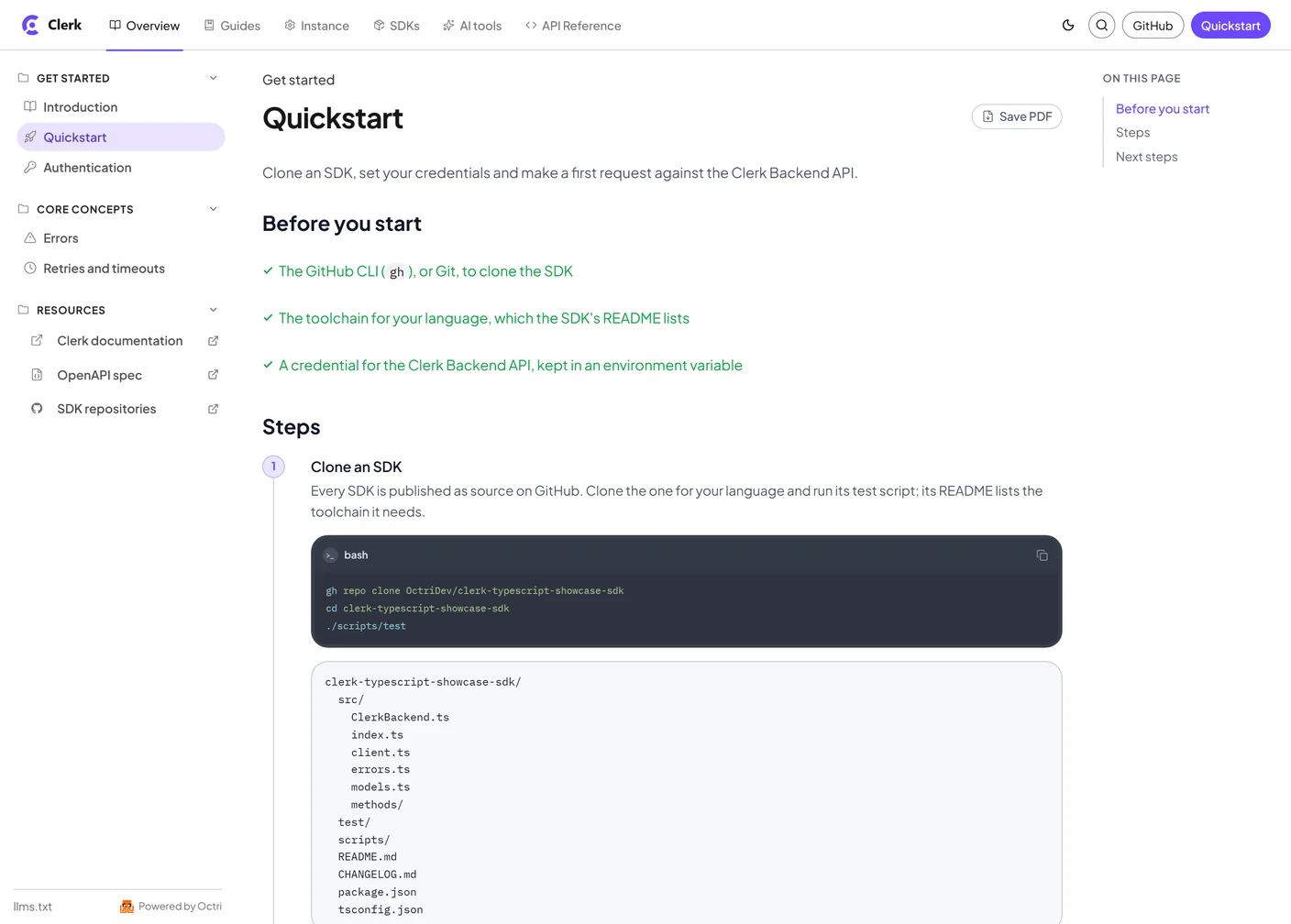
A simple structure helps: tell readers what they will accomplish, what they need first, and how to reach a visible result. The quickstart below, from an unofficial Clerk API showcase built with Octri, illustrates that progression. It is a separate example from Twilio, but it makes the same point about guiding the reader through the setup rather than just showing a final snippet.
GitHub: versioning on one page
Getting an API working is the beginning of the relationship. The documentation also has to explain what happens when the API changes.
GitHub's REST API versioning page answers the practical questions in one place. It shows the X-GitHub-Api-Version request header, identifies the version used when the header is omitted, distinguishes breaking from additive changes, and explains the support window. As of this review, its documented default is 2022-11-28, while 2026-03-10 is also supported. A previous version remains supported for at least 24 months after a newer version is released.
The useful thing isn't the date format. It's that developers can determine which contract their integration is using and how much migration time they have. The same page explains what to expect when a requested version has been retired. That is important information to be able to find before an upgrade is urgent.
Plaid: test credentials in the docs
A successful request proves that the happy path works. It tells you much less about whether an integration will survive real use.
Plaid's Sandbox test credentials provide a particularly useful answer to that problem. The familiar user_good and pass_good combination opens a basic test flow. Other documented credentials and scenarios let a developer exercise product-specific behavior and failure conditions without connecting a real financial account.
The page includes the kind of qualification that makes this useful rather than merely impressive: some special test credentials behave differently with the Sandbox Link OAuth flow, so Plaid tells readers when to use an appropriate non-OAuth test institution or another sandbox endpoint. The exception is documented where somebody trying the credentials will see it.
There's a broader principle here. If your API has rate limits, expired tokens, verification steps, or retryable errors, give developers a safe way to trigger them. Describe the expected status, response body, and recovery path. A test environment with only a successful example teaches the least interesting part of production behavior.
A useful exercise for your own docs is to write down three calls: one that succeeds, one that fails because of the caller's input or permissions, and one that fails in a way the client should retry. If a developer cannot deliberately reproduce the last two, your documentation may be leaving the most expensive integration decisions to trial and error.
Slack: permissions on every method
Authentication errors are often documented as though they happen after the developer has done something wrong. In practice, the permission model may be the first thing they need to understand.
On Slack's chat.postMessage reference, the required chat:write scope is part of the method's facts, near the request details. The page also explains a distinction that could otherwise cost a developer an afternoon: if an app needs to post in public channels it hasn't joined, it may need chat:write.public as well.
Now the developer can distinguish between a missing permission and a request body problem without guessing. It also gives them something precise to ask an administrator for, rather than the vague instruction to “give the app more access.”
Put required scopes on the endpoint page, even if you've already described them in an authentication guide. Readers routinely land on a single method from search. They shouldn't have to understand your entire permission system before discovering the one scope that method requires.
For more on credential creation, token formats, rotation, and the difference between 401 and 403, see how to document API authentication.
Shopify: a predictable release schedule
Shopify's versioning documentation takes the calendar side of the problem seriously. New stable versions arrive every quarter, and each is supported for at least 12 months. A team can plan an upgrade because it knows when the next version is expected and when support for its current version will end.
Shopify documents another important behavior: a request for an unavailable version can fall forward to the oldest accessible stable version, and the X-Shopify-API-Version response header tells the client which version actually served the request. A client can keep receiving successful responses while its assumptions about the API have changed. The header makes that behavior observable.
When publishing a versioning policy, explain the schedule and support window alongside the version selector, default, deprecation notices, and migration instructions. How to version API documentation covers the implementation in more detail.
Cloudflare: docs written for AI assistants too
The person using your API may not be the one reading every page. Increasingly, a coding assistant reads the documentation and drafts the integration, with a human reviewing the result.
Cloudflare's documentation treats this as a publishing problem. Its root llms.txt points to product-specific indexes. Individual pages are available as Markdown, including through an index.md address or a request with Accept: text/markdown.
That makes the same technical content easier to consume without pulling in the navigation, styling, and scripts of the rendered page. Cloudflare also pays attention to interactive components: important instructions shouldn't disappear just because a model doesn't operate a tab the way a person does.
An llms.txt file alone won't guarantee that an assistant finds, trusts, or correctly uses your documentation. The content still needs accurate operation names, explicit authentication, complete examples, and versions that agree with the API. Markdown is a good delivery format for those facts, not a substitute for writing them.
This is one reason to keep the OpenAPI specification and the human-written guides consistent. Agents can use the spec to understand the contract and the guides to understand the workflow. Making API documentation AI-readable covers the formats and checks in more detail.
What these API documentation examples have in common
Stripe, Twilio, GitHub, Plaid, Slack, Shopify, and Cloudflare have very different APIs and audiences. What their stronger documentation choices share is a sense of when someone needs a fact.
Stripe places the whole request beside its response because a developer needs both while writing a call. Slack names scopes on individual method pages because missing permissions are discovered there. Plaid makes failures reproducible while an integration is still being built. GitHub and Shopify put version rules in plain sight because they affect decisions made months before an upgrade. Cloudflare publishes clean text for readers who are software agents rather than people browsing a page.
A common temptation is to put everything into a giant getting-started guide. These examples suggest a more useful approach: answer the immediate question on the page where it arises, then link to the deeper explanation when the reader needs it.
How to apply these to your API docs
Choose one ordinary task your API supports and follow its documentation as if you have never seen the system before. Start at the landing page. Find the right endpoint, obtain a credential, make a request, and compare the response with the example. Then try a failure and find out how API changes are announced.
Every time you have to guess, write down what you were looking for. Those moments tell you where the next improvement belongs.
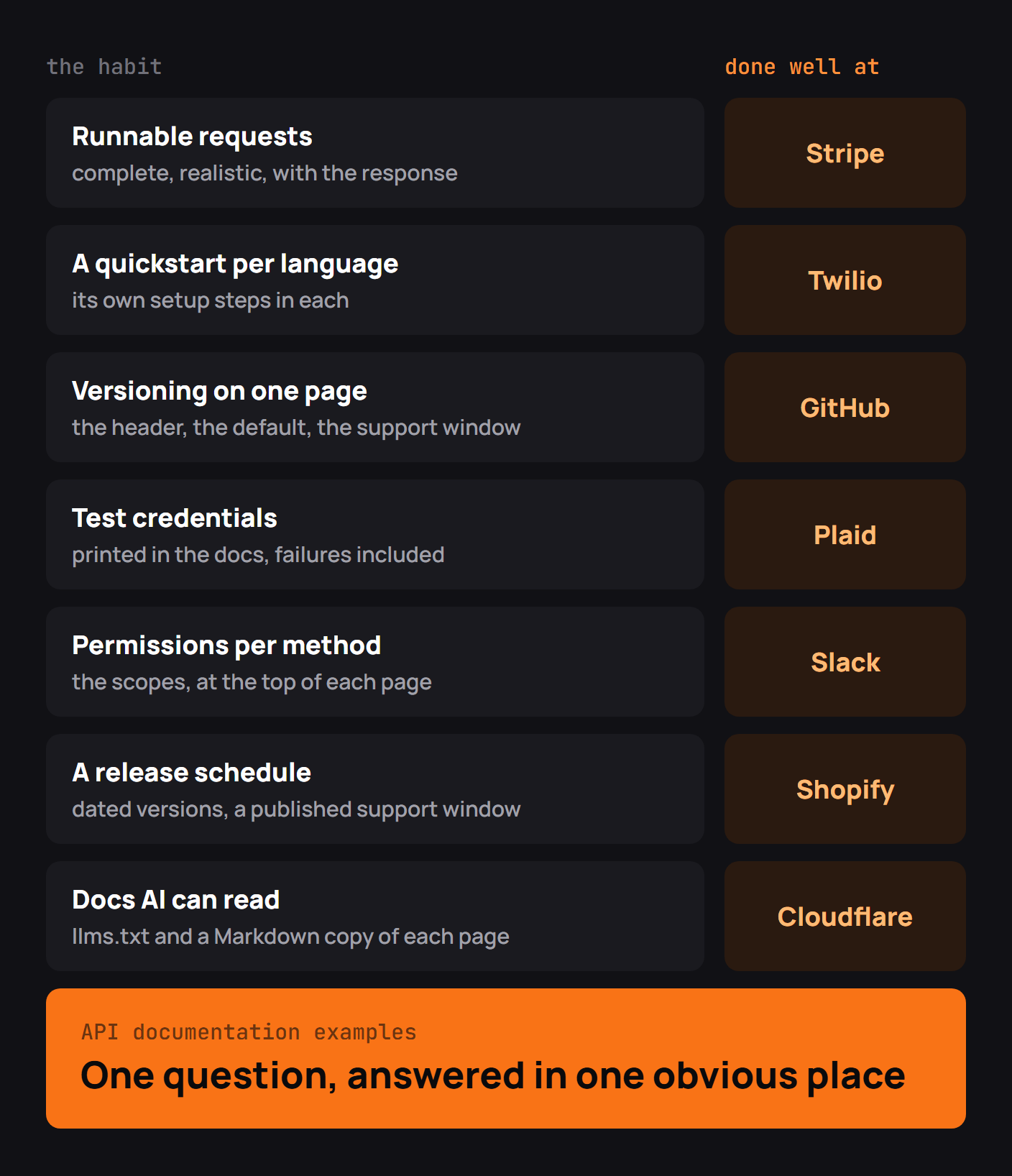
- If the first call requires guesswork, borrow Stripe's habit of showing the whole request and response.
- If users have to translate examples between languages, borrow Twilio's language-specific setup steps rather than swapping only the code snippet.
- If permissions and failures are hard to diagnose, borrow Slack's per-method scopes and Plaid's test scenarios.
- If upgrades catch users by surprise, document your contract and support window as clearly as GitHub and Shopify.
- If coding agents build integrations against your API, give them a stable OpenAPI spec and clean Markdown pages, as Cloudflare does.
Ask someone outside the API team to repeat that exercise. A maintainer can fill gaps from memory without realizing they're there; someone new cannot.
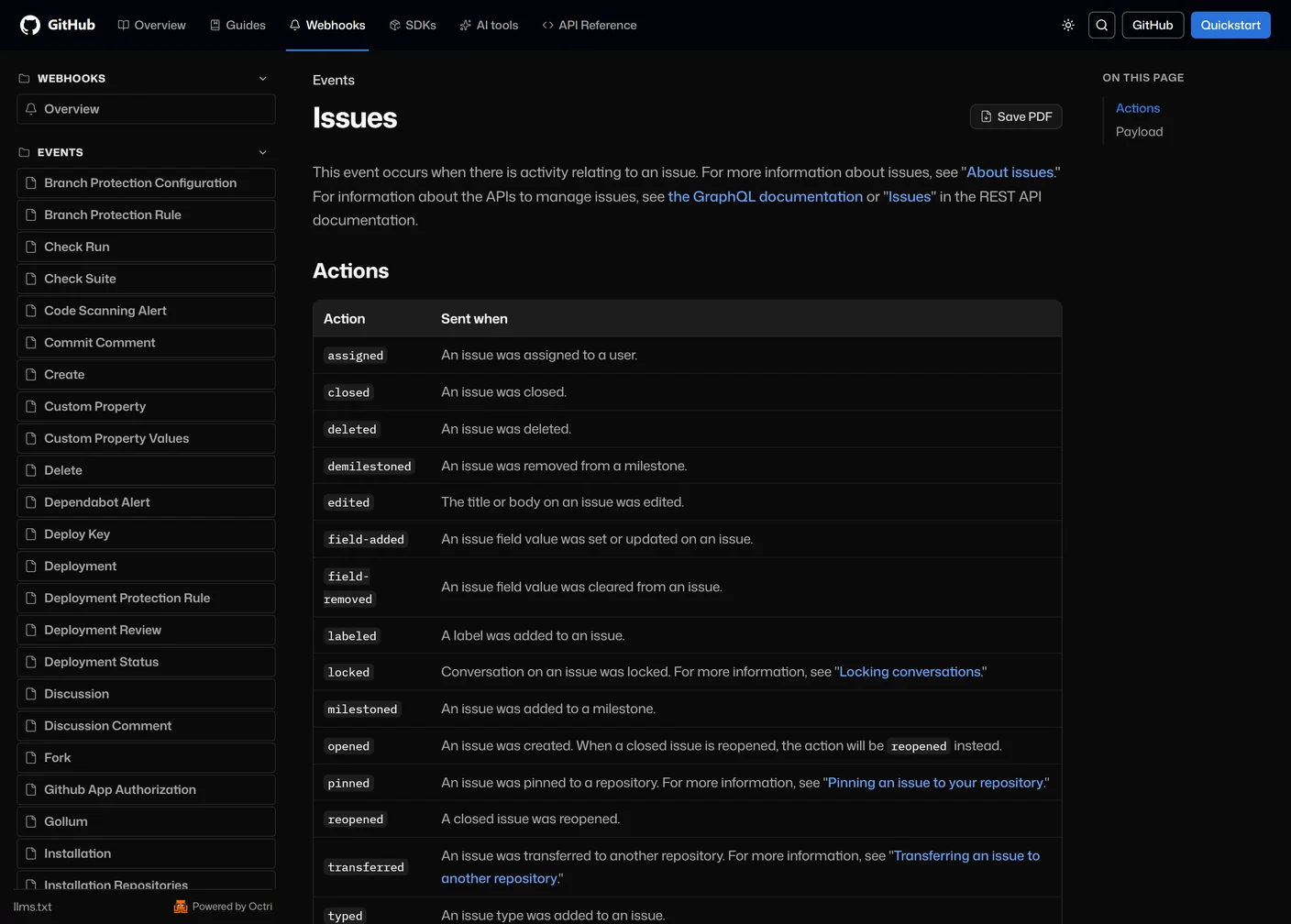
Some tasks also cross documentation categories. A developer working with issues may need both the endpoint that creates an issue and the webhook events that describe what happened afterward. Those pages should be easy to reach from each other. The image below shows an unofficial GitHub API showcase built with Octri, where webhook events sit alongside guides and the API reference. It illustrates documentation navigation, not GitHub's versioning policy.
API documentation with Octri
Octri API Studio is built around several of these practices. It generates an API reference from an OpenAPI spec, shows SDK request examples for the languages you publish, offers a playground for making requests, and publishes Markdown versions of documentation pages with an llms.txt index. You can write the surrounding guides in a visual editor or MDX. Documentation versioning is available on Growth and higher plans.
Those features handle the publishing and presentation work. They cannot decide what a developer needs to know next. That still takes someone testing the docs against an actual task, noticing where the instructions run out, and writing the missing explanation.
The best API documentation lets someone make progress without thinking about the documentation itself. They find the page, run the request, understand the result, and return to building what they came to build.