By the Octri team · Updated
Swagger UI vs hosted API docs: which do you need?
Swagger UI is often the first public face of an API, and for good reason. Point it at an OpenAPI description and you have something developers can inspect and test without first building a documentation website. The question arrives later: is that reference enough for the people trying to integrate your product?
A comparison between Swagger UI and hosted API docs is most useful when it begins with the tasks developers need to complete, not with a feature checklist assembled by a vendor.
What is the difference between Swagger UI and hosted API docs?
Swagger UI renders an OpenAPI specification as an interactive API reference. It presents operations, parameters, schemas, responses and a Try it out interface. A hosted documentation platform typically adds the wider publishing environment: guides, navigation, site search, branding, changelogs, version management and hosting, though features vary between providers and plans.
These are not mutually exclusive choices. Many teams continue to expose Swagger UI for internal development while publishing a richer site for customers. Both can consume the same OpenAPI contract.
What is Swagger UI?
Swagger UI is an open-source reference renderer. It can be embedded in a web application, hosted as static assets or deployed in a container. Frameworks such as FastAPI commonly provide it as a convenient built-in documentation surface.
The central advantage is speed: a spec gives you a navigable reference without someone hand-authoring a page for every operation. When the spec changes, the rendered reference changes with it. For a team that already understands the system's workflows, that may satisfy most documentation needs.
What Swagger UI does well
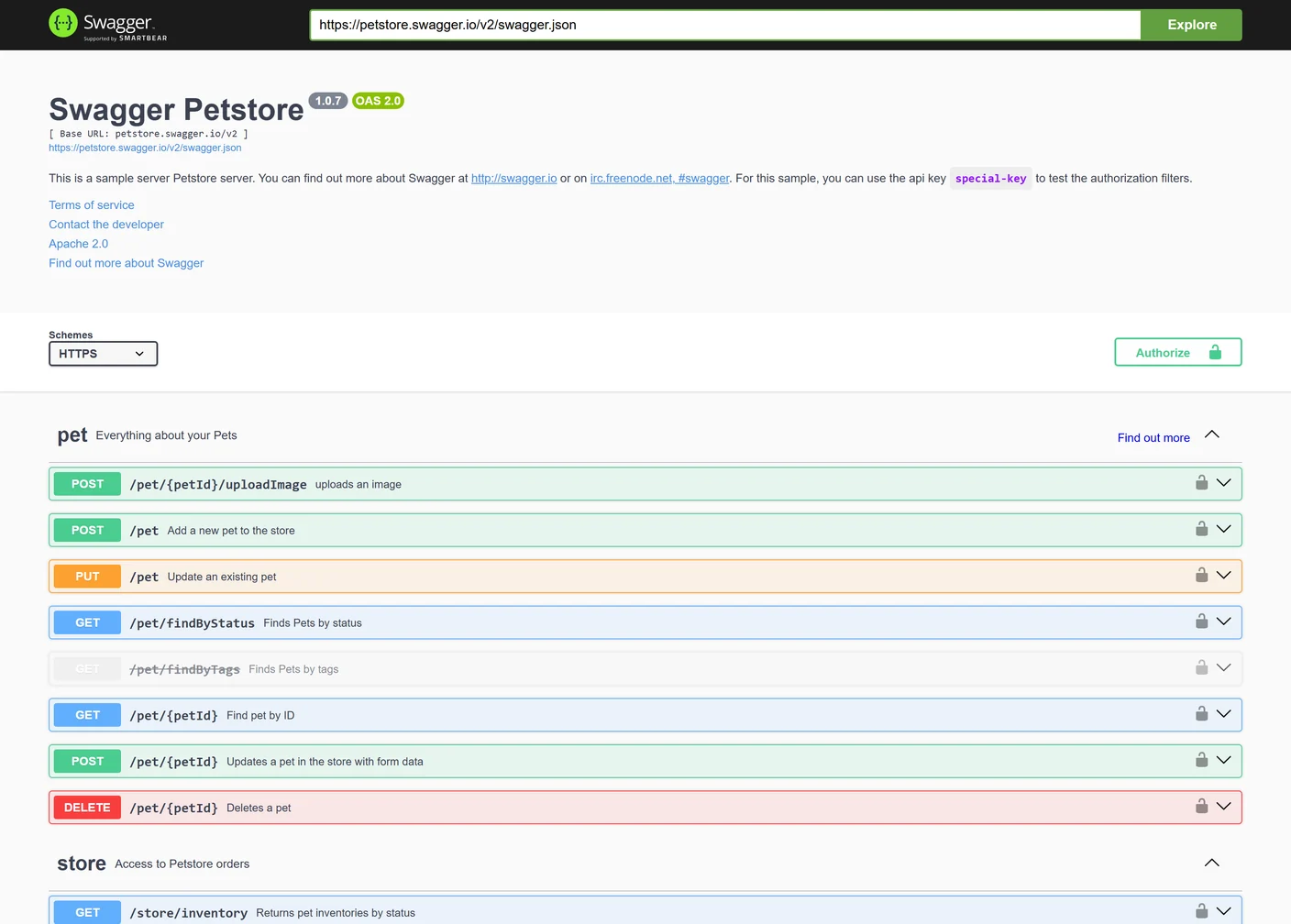
It is hard to beat a generated interactive reference for seeing what an API exposes. Required parameters are marked, request schemas are expandable, response types are visible, and developers can usually try requests from the page. It is especially helpful during service development, debugging and integration work by teams that know the domain.
Swagger UI also makes spec quality visible. Unclear operation summaries, ambiguous schema names and empty field descriptions appear on the page exactly as the author wrote them. That feedback can improve the OpenAPI source for other consumers, including SDK generators and testing tools.
Where Swagger UI stops
I used the public Swagger Petstore demo as a review exercise and asked three questions: can I find the operation that adds a pet, can I see its request shape, and can I learn the sensible sequence for building a small pet-management application without prior knowledge of the service?
The first two belong naturally to an endpoint reference. The third is different. It asks how to move through authentication, creating a record, retrieving it and handling failures. I could inspect operation-oriented information, but the workflow itself would need a guide or tutorial built around the reference. I was reviewing the published interface and its documentation; I did not run credentialed requests against the demo.
That distinction became the useful part of the exercise. It is tempting to ask whether a reference renderer has “enough features,” but the reader's missing information may have nothing to do with the renderer. The API team may simply need to write the path through the operations.
There are also operational considerations. Swagger's CORS documentation explains that Try it out uses requests from the user's browser, so cross-origin API calls must be allowed by the API's CORS policy, including any headers the client sends. The right approach depends on where the reference and API are hosted. A same-origin setup may avoid that particular issue; a public docs domain calling a different API domain needs deliberate configuration.
What a hosted API docs site adds
A hosted documentation site generally combines reference material with written tutorials, searchable guides, navigation that follows tasks, branding and a managed deployment. Some offer request playgrounds through a server-side proxy, removing the need for the API to allow cross-origin browser calls from the docs. Others use browser requests. Verify the implementation rather than assuming all hosted providers behave alike.
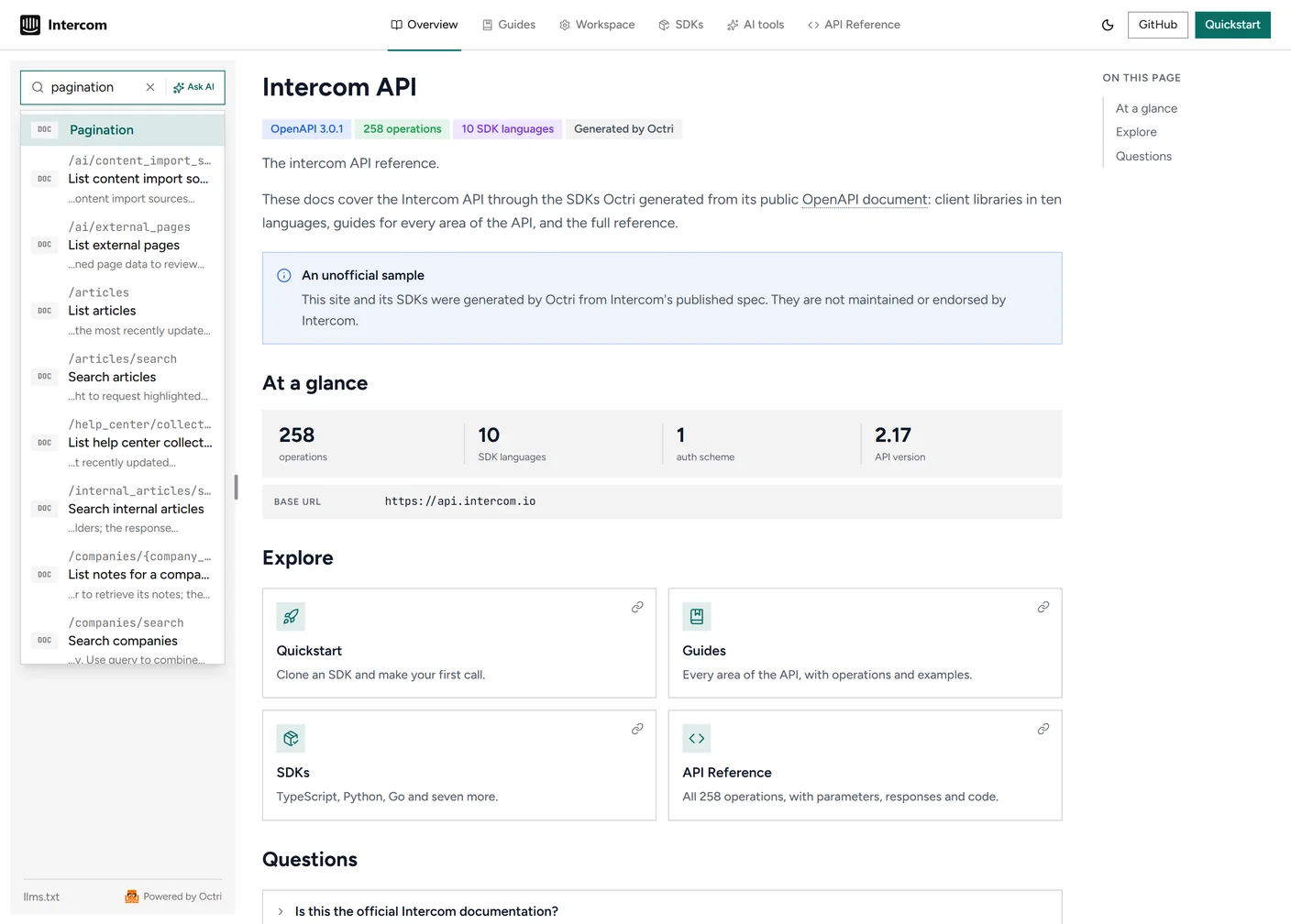
A site search that knows about both guides and endpoints can answer queries such as “pagination” with the conceptual explanation and the methods to which it applies. Versioned navigation can keep old integrations on the documentation that matches their contract, while a changelog explains what has changed.
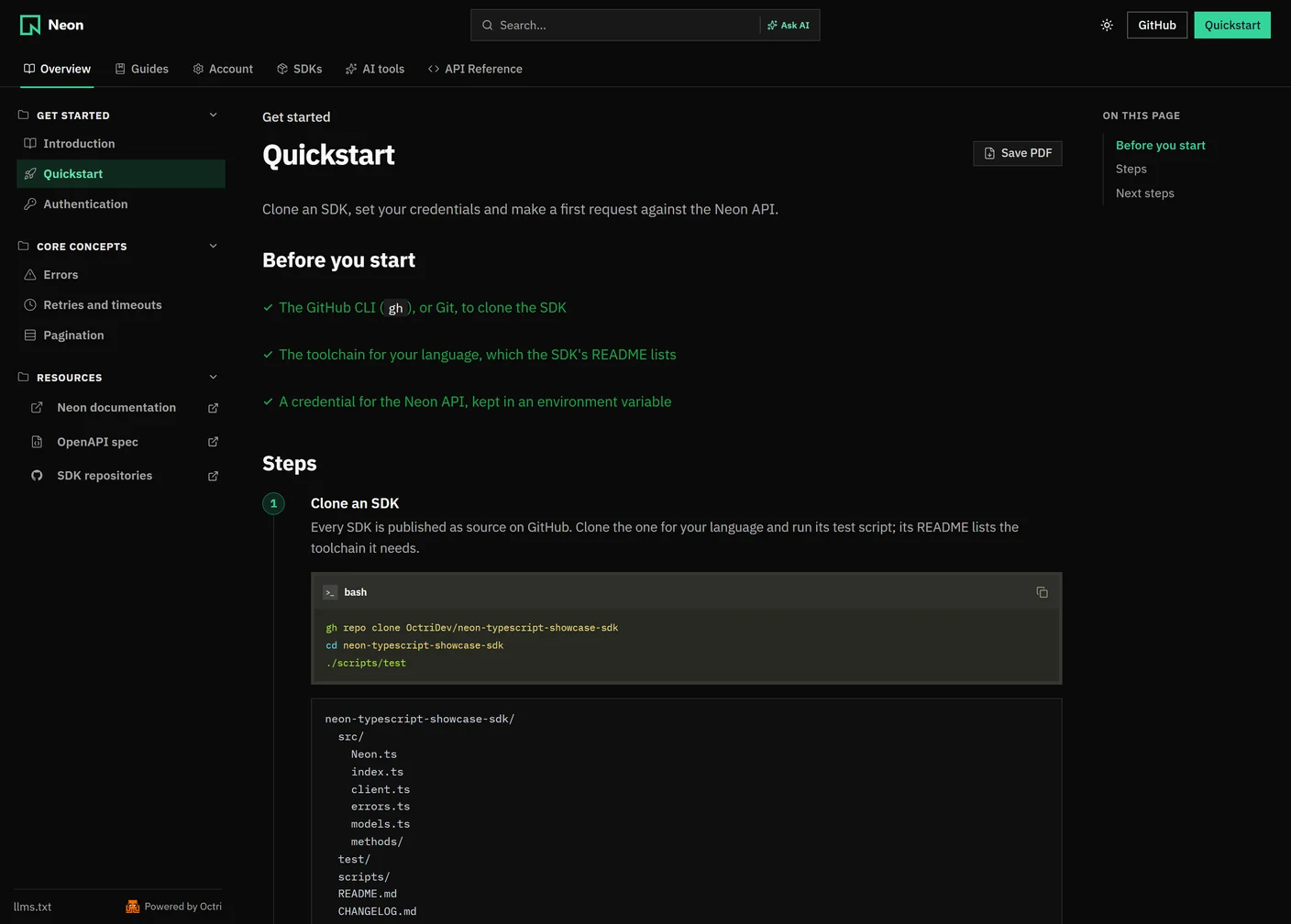
The image below shows an unofficial Neon API documentation showcase built with Octri. Notice that the quickstart appears alongside other guide categories and the API reference. The point of the layout is to let a new developer follow a task before being expected to know which endpoint they need.
When is Swagger UI enough?
Swagger UI can be an excellent endpoint for an internal service used by one or two teams, a small API in active development, or a debugging interface where engineers mainly need to inspect schemas and issue requests.
If readers already understand the resource model, the missing tutorial may not be worth building. Some teams also place Swagger UI within a larger docs site they maintain themselves, adding guides only when users need them. In that case, the tool is part of a working solution, not a limitation to eliminate.
When do you need hosted API docs?
A broader documentation site becomes more valuable when readers are external, when a first integration requires several operations, when you need to explain authentication or error recovery, and when the site itself needs stable branding, analytics or a versioned publishing workflow.
The most important signal is repeated uncertainty among readers. If customers keep asking where to begin, why a scope is missing or how the second page of results works, adding a guided path is likely to help more than rearranging endpoint groups.
Hosted does not automatically mean better writing. It gives you tools to deliver explanations, but someone still has to produce them and test whether they are accurate.
Can you use Swagger UI and hosted docs together?
Yes. Keep the OpenAPI file as the shared contract and feed it to an internal Swagger UI deployment and an external documentation platform. Developers maintaining the service can use the lean reference near their code; customers can use a docs site with guides, changelogs and SDK examples.
The main requirement is consistency. If the two references read different copies of the spec or update on different schedules, you have created a second documentation problem instead of solving the first.
How do you move from Swagger UI to hosted docs?
The most valuable thing to carry over is the OpenAPI description, not the rendered HTML. Import that spec, inspect the generated reference and improve descriptions that are missing. Then write a quickstart, authentication page and the first few task guides based on real integration questions.
Test a complete workflow through the new site, including Try it authorization and errors. Publish on the intended domain, preserve existing links with redirects and define which system is responsible for future spec updates. If the internal Swagger UI remains useful, keep it and make its audience clear.
Swagger UI or hosted docs: a checklist
- Do readers already know the API's workflows, or must the docs teach them?
- Is a reference alone sufficient, or do they need a quickstart and task guides?
- Can the Try it interface call the API under the real CORS and authentication rules?
- Are search, versioning, analytics, custom branding or access control required?
- Who maintains the publishing stack and its dependencies?
- Can one validated OpenAPI file drive every reference surface?
- Have you followed the first integration task from start to finish on the published site?
Hosted API docs with Octri
Octri API Studio can generate a hosted reference from the same OpenAPI description used by Swagger UI, with SDK-oriented examples and a request playground. It also supports written guides, cross-site search and Markdown output for AI tools, with documentation published to a custom domain.
The useful test is the same one I applied to the Petstore demo: identify one task a new developer wants to complete, then see whether the documentation gets them from account setup to a visible result. The right platform is the one that lets you make that path clear and keep it correct after the next release.