How we reduced our MCP server's context window usage by up to 267x
We tried generating an MCP server for an enormous API schema and it consumed up to 403k tokens from the context window whenever it loaded, so we came up with a solution to bring it down by 267x with little effect to the end result
We at Octri.dev generate MCP servers for users with public APIs and provide them with safety tools out of the box to help them setup the best MCP experience they intend to as easy as possible.
One of the things we noticed while working on the MCP feature was that not all APIs provided by our users have a practical amount of endpoints, so we had one thought, what if we have a user with an absurdly large spec file trying to create an MCP server, how much would our generated MCP server consume from the available context window?
The Context Window Benchmark
So we set out on a journey to find the most absurd public specs out there and we found the perfect one for a site almost every developer uses on a daily basis and that is... drumrolls please... GitHub!
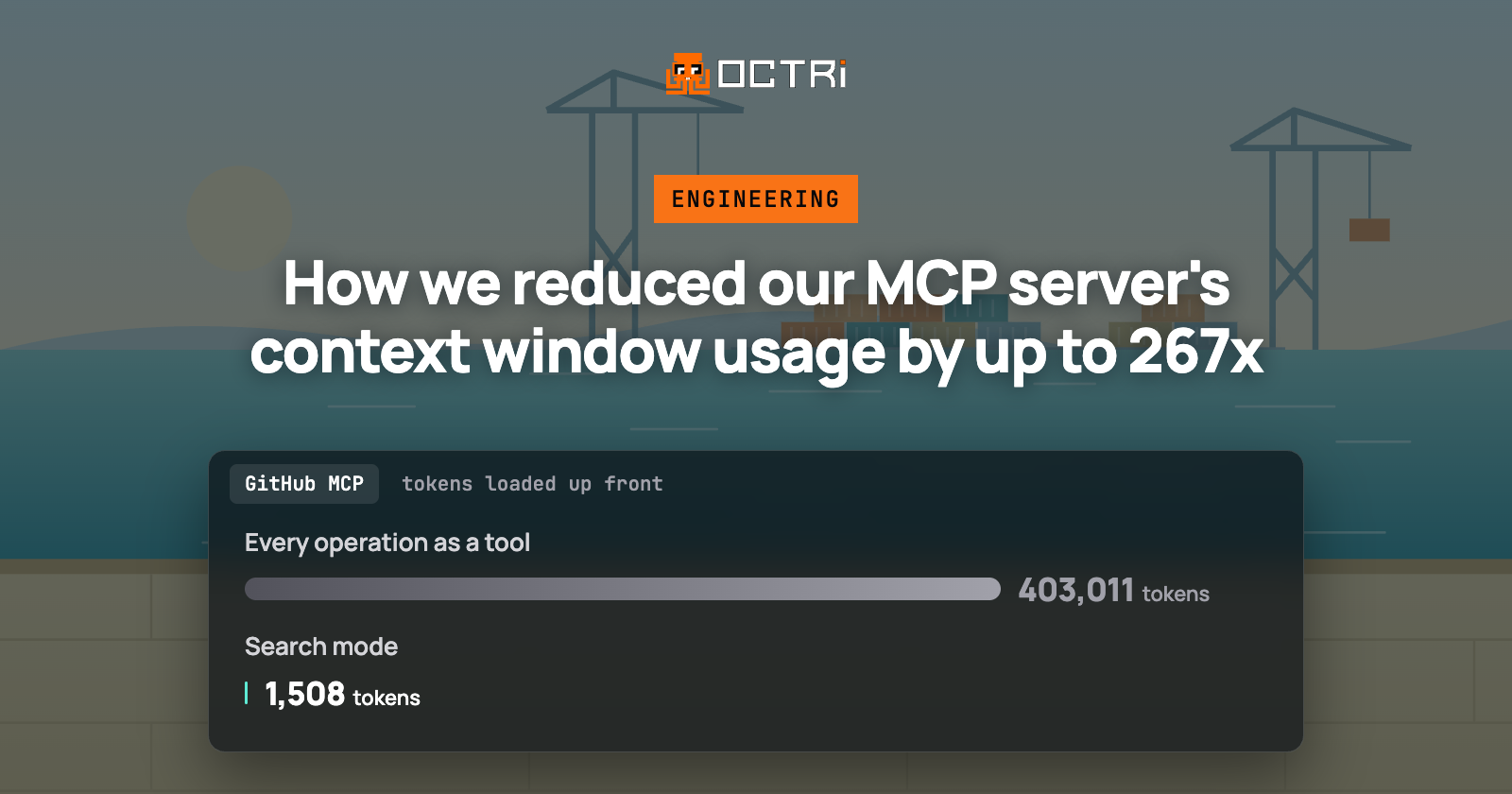
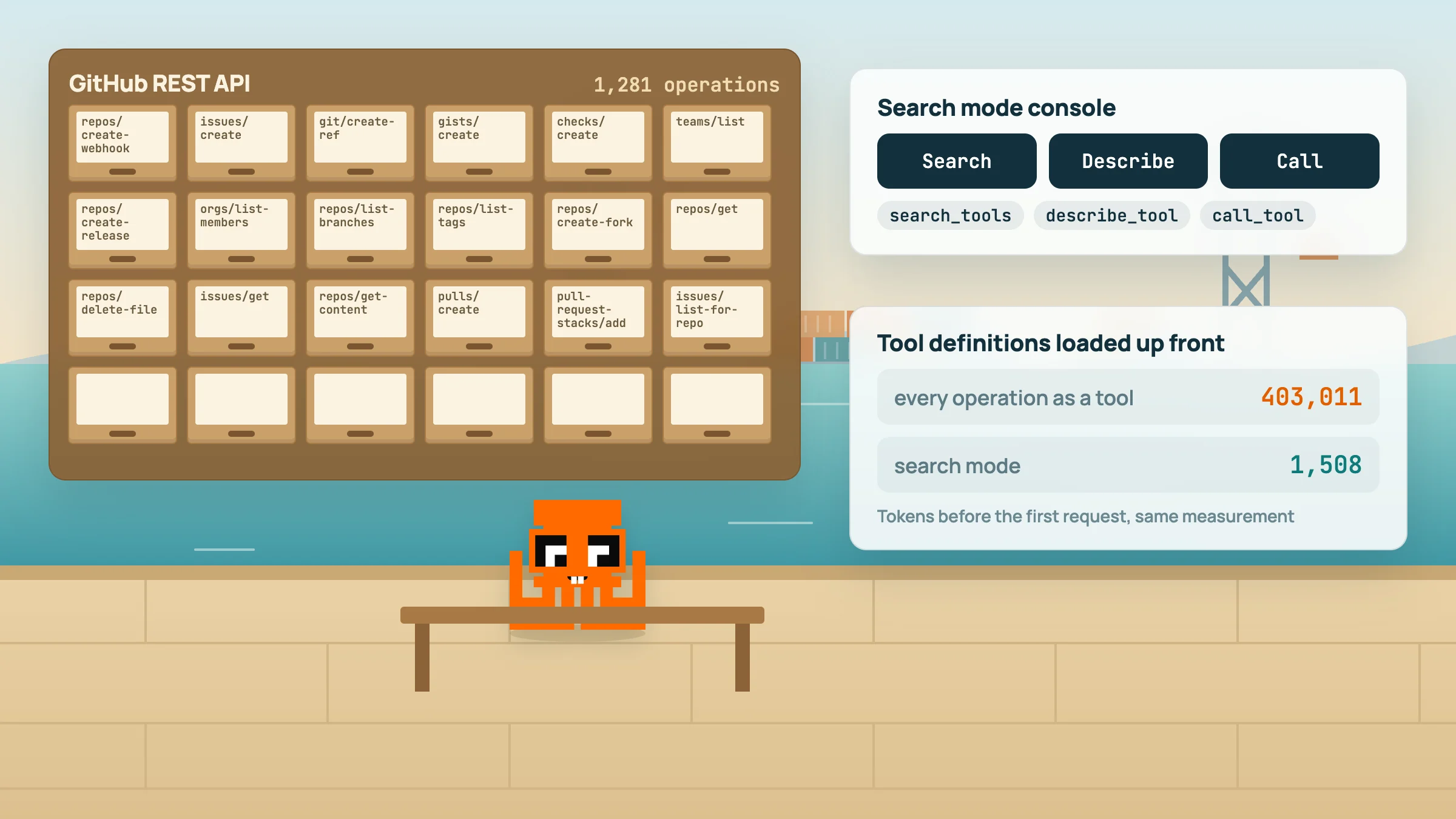
We found out GitHub has more than 1200 endpoints exposed via their public API so we thought this is a good candidate for an MCP Server experiment and use it in our MCP Server Generator, and the result was quite shocking honestly, the tokens being consumed by simply loading the GitHub MCP's tools into the current context: 403,011 So for some agent IDEs such as Codex where the context window limit by default is 372k tokens, GitHub's generated MCP is to either:
a) Not load the MCP Server entirely b) Get stuck in an infinite auto-compact loop
Both of them don't really sound that exciting unfortunately, so we thought of alternative solutions and one thing that quickly came to our mind is that we could introduce a new mode in our MCP: Search mode!
Instead of exposing all of the tools directly to the agent and consuming more than 400k tokens in GitHub's case, we'd instead expose a smaller set of critical tools and add 3 new tools provided by us: search_tools, describe_tool, and call_tool.
So if someone asked their agent to list the open pull requests in a specific repo, the agent would first search for a tool that can perform that specific task (using search_tools), retrieve its schema to identify which arguments are needed to pass around (using describe_tool), and call it (obviously using call_tool for this one!)
Search Mode VS Vanilla Mode
So we have re-generated GitHub's MCP Server this time after implementing Search mode into it, and the result was a night and day difference! The total tokens used by the generated MCP Server were 1,508 tokens! We've done a quick test run of this prototype though and after almost calling it a day, we noticed a serious issue, calling the search_tools tool with a vague request such as "list pull requests" returns 529 tool matches, and out of all of those results, the actual tool for listing pull requests in a repository came in fourth, behind even a tool which lists reactions to a pull request review comment.
The agent could've still picked the right operation from the results, but we didn't want to take in any chances and allow for edge cases for more vague requests where the right tool ends up in the next page, and we also weren't happy with the fact that 529 matches showed up, if we could make the search results more precise and limit the matches to 10, that could save us quite a lot of server-side resources on our end.
Why were those tools ranking higher than the actual one?
If we take a look at the summaries of the 3 tools we've been talking about from GitHub's OpenAPI spec, we'd get something like this:
| Operation ID | HTTP method and path | Summary |
|---|---|---|
pulls/list |
GET /repos/{owner}/{repo}/pulls |
List pull requests |
repos/list-pull-requests-associated-with-commit |
GET /repos/{owner}/{repo}/commits/{commit_sha}/pulls |
List pull requests associated with a commit |
reactions/list-for-pull-request-review-comment |
GET /repos/{owner}/{repo}/pulls/comments/{comment_id}/reactions |
List reactions for a pull request review comment |
It's quite easy for us to tell which one of those we'd want to use, but if we're searching through the contents of an OpenAPI spec, there's a lot more text to account for than just those 3 summaries. Take the last operation for example, not only does it mention pull requests in its summary, but it also has pulls in its HTTP path and mentions pull requests in its description, so we'd end up with a bunch of relevant terms for an operation that has very little to do with what we're actually trying to search for.
We wanted to see how much of a difference it would make if we treated some of those fields differently when searching through the spec, so we downloaded a more recent copy of GitHub's public OpenAPI spec (which by then had 1,281 operations) and set up a separate search experiment using BM25.
For those who aren't familiar with BM25, it's a search ranking algorithm that takes into account how frequently a word shows up in a document, how common that word is across all the documents we're searching through, and the length of the document itself. In our case, each operation would be considered a document.
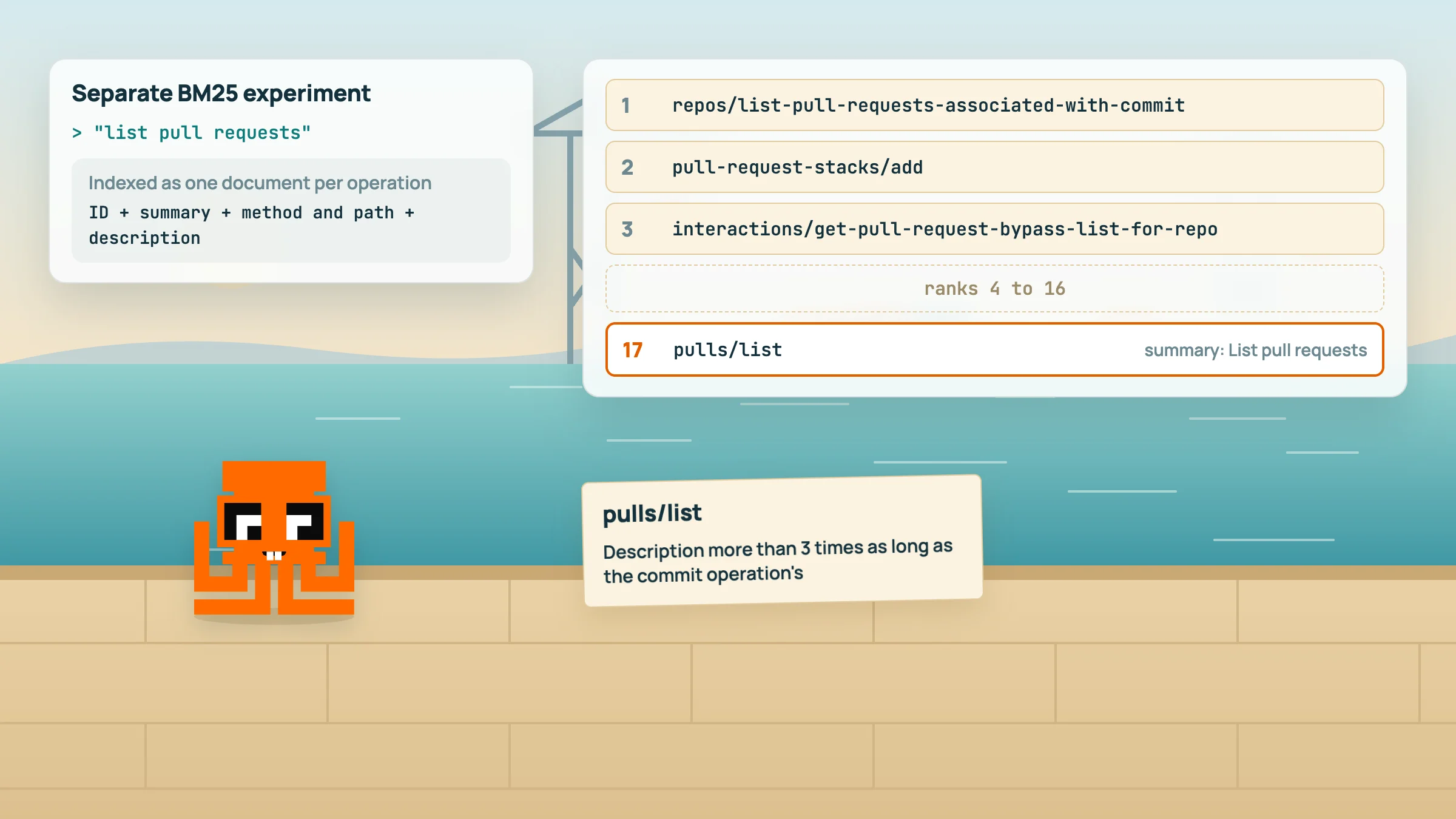
For the first iteration of this experiment, we combined each operation's ID, summary, HTTP method and path, and description into one string and indexed it. We then searched for the same thing we did earlier, "list pull requests", and the first 3 results we got back were:
repos/list-pull-requests-associated-with-commit
pull-request-stacks/add
interactions/get-pull-request-bypass-list-for-repo
And where was pulls/list this time? All the way down in 17th place! Had we limited the results to 10 in this particular implementation, the agent wouldn't have even seen the tool it was looking for in the first page of results.
This was a separate BM25 test from the search mode we had tested earlier, so we weren't trying to reproduce that fourth-place result exactly, but it did give us something interesting to work with. The tool for listing pull requests has a summary of literally "List pull requests", yet its description is more than 3 times as long as the description of the one for listing pull requests associated with a commit. Since we'd combined both fields into one document, the content and length of the description could influence the ranking of the operation, and there was nothing in our implementation that gave any extra importance to the fact that the summary itself matched our search query.
Giving more weight to the summary
So one thing we thought of trying was to split up the fields and index each one individually, since in most cases we'd expect the summary to contain a much better indication of what an operation does and the description to contain more information about how that operation works. We'd still want to search through the description though, especially since some of the specs we deal with don't have particularly descriptive summaries (more on that in a bit).
We did another iteration of the experiment where we'd calculate the BM25 score for each field separately and combine them as follows:
score = (
    3 * summary_score
    + operation_id_score
    + 0.5 * route_score
    + 0.25 * description_score
)
There's no particular reason behind those exact weights other than wanting to give the summary a lot more importance and the description a lot less for the sake of this experiment, so this is something we'd have to tune further depending on the results we get across different specs.
After doing so, we ran the same search query again and got the following results:
pulls/list
repos/list-pull-requests-associated-with-commit
search/issues-and-pull-requests
We also wanted to make sure that we didn't accidentally give the generic tool too much preference and make it harder to find the more specific ones, so we tried searching for "list pull requests associated with a commit" and "list reactions for a pull request review comment" and fortunately both of those returned the intended operation in first place as well.
Testing the changes on the rest of GitHub's API
We came up with 26 different search queries for things we'd realistically want to do using GitHub's API and picked out which operation we'd expect to find for each one of those beforehand, here are some of the more interesting results we got from doing so:
| Search query | Rank before | Rank after |
|---|---|---|
| list pull requests | 17 | 1 |
| list repository issues | 7 | 1 |
| create a release | 13 | 1 |
| get a repository | 75 | 3 |
| download workflow run logs | 2 | 1 |
| get an issue | 46 | 2 |
| get a file from a repository | 5 | 31 |
Out of the 26 queries we ran, the number of times the intended operation came in first went from 14 to 21, and 25 of the 26 operations made it into the first 5 results as opposed to 20 in the previous test, so this was looking quite promising apart from that last result in the table above.
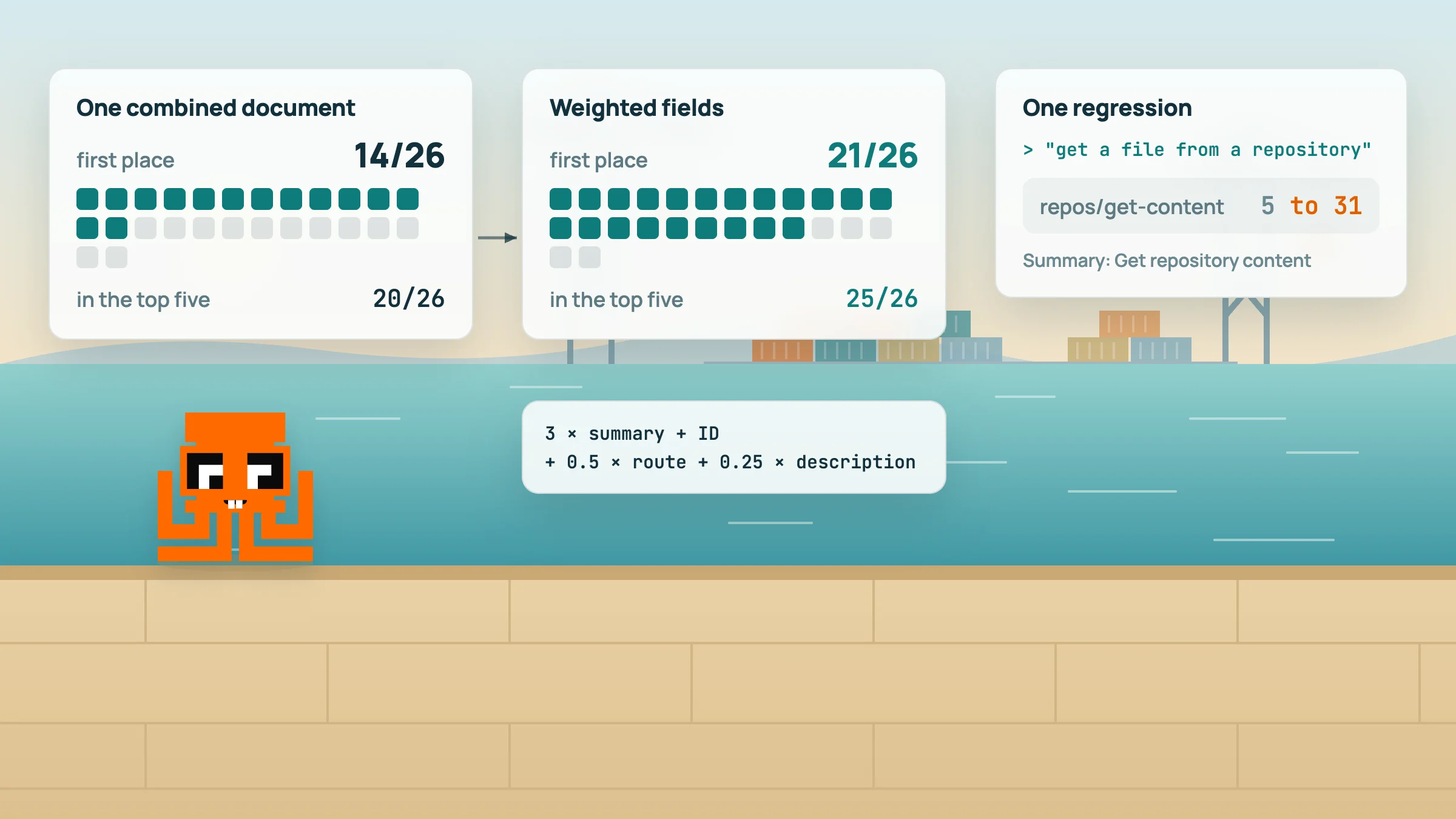
You might be wondering how we managed to make the results for getting a file that much worse by simply giving the summary more importance, so we took a look at the operation we were trying to find (repos/get-content) and its summary turned out to be "Get repository content". The description does mention that the operation can be used to retrieve a file or directory, but we had just reduced its weight quite considerably, so we'd end up giving preference to other operations with "file" in their summaries, including repos/delete-file (probably not the best tool to suggest to an agent that's trying to read a file!).
And this is where it gets a bit tricky for us since we're generating these MCP servers from other people's specs and we don't get to decide whether someone calls an operation "Get repository content" or "Get a file from a repository". Both are perfectly reasonable summaries for the same endpoint, but we'd get completely different results from our search depending on which one was used.
One thing we'd like to try out for cases like this is a second pass that can take into account what the user means by their search query, so something like "fetch a file" could also be understood as retrieving repository content even if those words aren't present in the summary. We'd also want to distinguish the actual action being requested from the resource it's being performed on, which would help with the issue of delete-file ranking above get-content. We haven't tested that part yet though, and we'd want to try it on other specs before settling on a solution based on GitHub's alone.
Limiting the search results
Going back to the issue we mentioned earlier of getting 529 matches for a single search query, we initially thought of limiting the results to 10, but this would mean we'd still be passing 10 tools to the agent even if only 2 or 3 of them were relevant to what it was searching for. And for some queries we might have more than 10 tools that are worth considering.
So instead of setting a hardcoded number of results to return, we've implemented a dynamic match quality filter where we'd take the score of the highest matching tool and only show results with a score that's up to 30% lower than that. So if our first result has a match score of 70%, we'd show all matches down to 49% (70% * 0.7).
This way if there's quite a big difference in the scores between the first 3 results and the rest, we'd only return those 3 (assuming they're the only ones within that range), and if there are more than 10 tools within that range, we'd still allow the agent to consider them. The number of results we return now depends on the scores of the tools for that particular query.
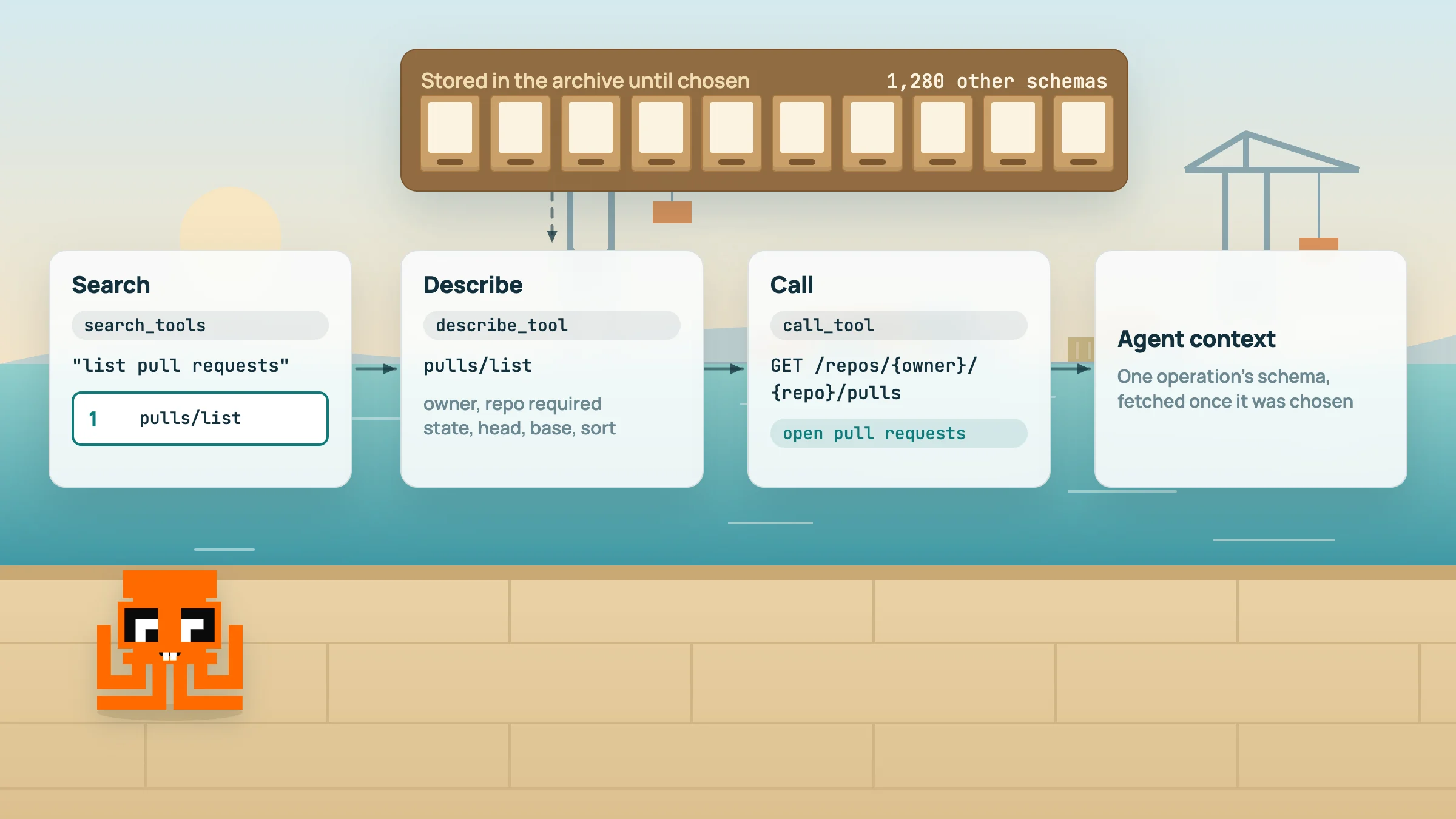
As for our original experiment with GitHub, we managed to bring the initial context window usage down from 403,011 tokens to 1,508 tokens while still making all of its API operations accessible to the agent. We'd obviously consume some more tokens as the agent searches for tools, retrieves their schemas and gets responses from the API, but if someone just wants to list the open pull requests in a repo, there's no reason for their agent to have the schemas for creating webhooks, managing releases and hundreds of other unrelated operations loaded into its context.
If you'd like to try out the ranking experiment yourself, we used this revision of GitHub's OpenAPI spec for the BM25 results above.
You can also try Search mode on your own spec through Octri.dev and play around with the weights yourself, especially if you have an API with quite a lot of endpoints like GitHub's. It'd be interesting to see how much of a difference it makes on other large APIs!