By the Octri team · Updated
What is MCP? The Model Context Protocol explained
A coding assistant can explain how to call an API without ever touching the API. The moment you ask it to read a current issue, inspect a database row or create a deployment, explanation is no longer enough. The application needs a way to discover external capabilities, invoke them, and return the result to the model.
MCP, the Model Context Protocol, is an open standard for that connection. It gives AI applications a common way to talk to tools and data sources without requiring a custom integration for every pairing of application and service.
What is MCP?
MCP defines how an AI application communicates with a tool server. A server advertises capabilities; the application's MCP client lists them; the model sees descriptions of available tools; and the host can execute a chosen call and return the result. The application still decides when an action is allowed and what to show its user.
This is distinct from the model having unrestricted access to a computer. The available capabilities come from explicitly connected servers and the rights granted to them. A server that exposes only get_order does not thereby grant a general ability to edit orders.
Why MCP exists
The problem MCP tries to solve predates the protocol: one application knows how to talk to a service, while another needs a separate connector for the same operations. Integration work multiplies with every client and every provider.
The origin story is itself a useful Type B example. In Anthropic's November 25, 2024 introduction of MCP, the team described AI assistants that were increasingly capable but isolated from the systems holding useful data. The announcement framed each new data source as a separate custom implementation problem and introduced a common protocol, SDKs and sample servers as a response. It also identified early adopters and developers extending tools such as Claude Desktop.
That account explains the design better than a slogan about “giving AI hands.” The problem was duplicated integration work and missing context. The solution was an interface between hosts and servers that many implementations could share.
How MCP works: hosts, clients and servers
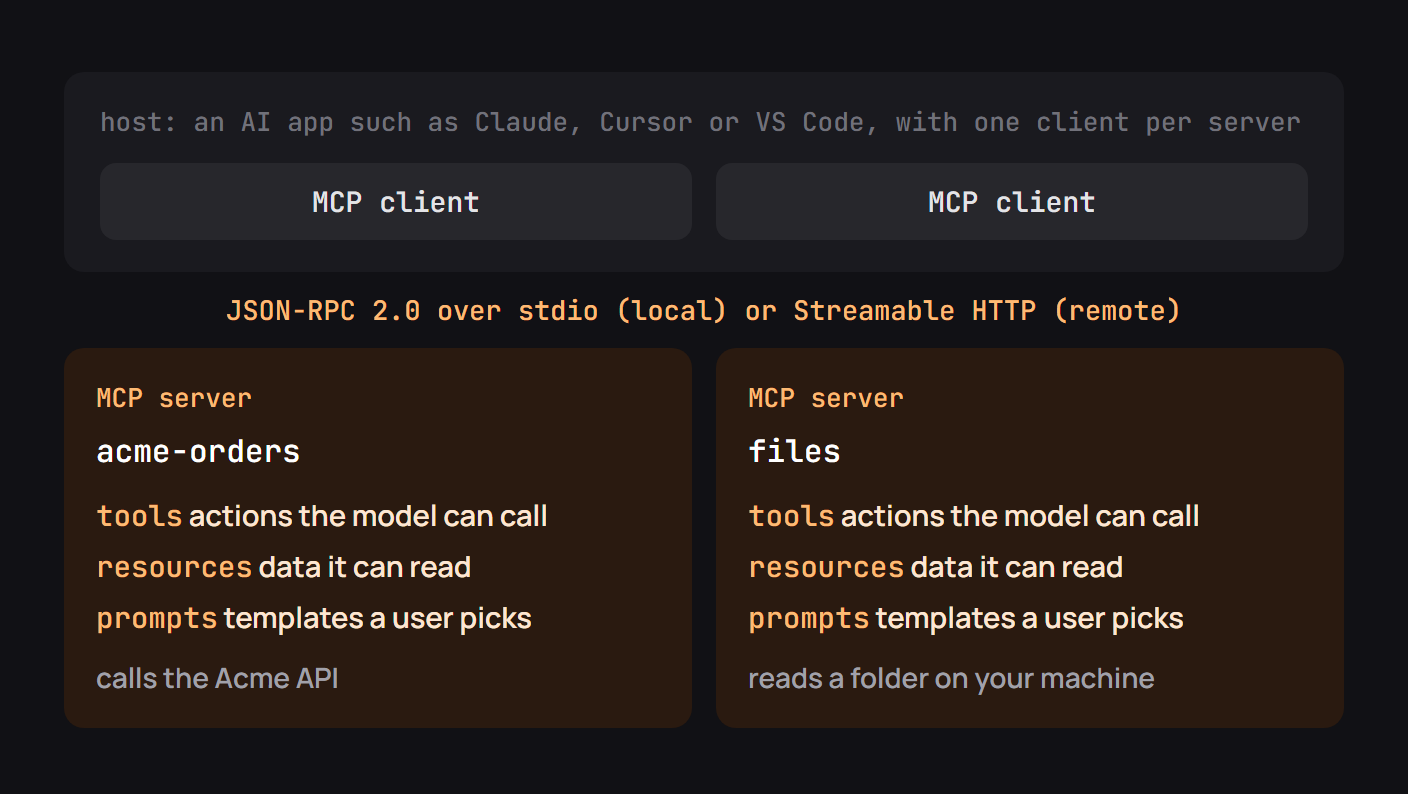
Three roles are easy to confuse. The host is the AI application the user works in, such as Claude Code or an editor. It has an MCP client responsible for the connection to a given server. The server exposes tools, resources and possibly prompts.
Messages are based on JSON-RPC. Local servers commonly communicate over stdio, with the host launching a process. Remote servers typically use Streamable HTTP at an HTTPS endpoint. Neither arrangement gives the server permission to do something outside its configured credentials and the host's approval policies.
Tools, resources and prompts
A tool is an action the model may request, such as looking up an invoice. A resource is data the host can retrieve or expose to the model. A prompt is a reusable template or workflow the server offers for selection. These are separate concepts even though casual explanations often call all of them “tools.”
| Capability | Example | Primary purpose |
|---|---|---|
| Tool | get_invoice(invoice_id) |
Carry out a typed operation |
| Resource | A policy document or schema | Supply context |
| Prompt | “Investigate failed payments” | Offer a reusable starting workflow |
Descriptions and schemas are essential for tools: they tell the model when to call a function and which arguments are valid. The same fields can become dangerous when supplied by a malicious server, so clients need a trust model for tool metadata.
A working MCP server
A tiny lookup server is enough to see the structure. The following Python sketch uses the v2-style API of the official SDK; verify imports against your installed version before running it:
from mcp.server.mcpserver import MCPServer
from mcp.server.mcpserver.exceptions import ToolError

server = MCPServer("sample-inventory")
STOCK = {"item_1": 12, "item_2": 0}

@server.tool()
def get_stock(item_id: str) -> dict:
    """Read available inventory for a known item ID."""
    if item_id not in STOCK:
        raise ToolError("Unknown item. Choose item_1 or item_2.")
    return {"item_id": item_id, "available": STOCK[item_id]}

if __name__ == "__main__":
    server.run()
The SDK maps the function's name, docstring and parameter type into a tool contract, then handles the protocol. The actual inventory lookup is your code. A client should be able to discover get_stock, supply a string ID and receive a structured result or a recoverable error.
What goes over the wire
A client commonly requests tools/list before a model can choose a tool. A later tools/call message names the selected tool and passes its arguments. The server responds with a result envelope that the host passes back to the model.
{
  "jsonrpc": "2.0",
  "id": 7,
  "method": "tools/call",
  "params": {"name": "get_stock", "arguments": {"item_id": "item_1"}}
}
That is a protocol example, not an HTTP request to the inventory API. A remote MCP endpoint carries the JSON-RPC message within its transport. The tool implementation may then call an ordinary REST API, database or other service.
What changed in the 2026-07-28 revision
MCP evolves through dated specification revisions. The 2026-07-28 changelog changes several foundational behaviors, so a tutorial written for a 2024 or 2025 server may describe a handshake or session header that no longer exists.
| Earlier revisions | Revision 2026-07-28 |
|---|---|
initialize and notifications/initialized established a connection |
Requests carry protocol version and client capabilities in _meta |
Streamable HTTP could use Mcp-Session-Id |
Protocol sessions were removed; servers can return explicit state handles |
| Capability discovery happened during initialization | server/discover advertises supported versions and capabilities |
| Results could omit a completion marker | Results include resultType, such as complete or input_required |
| Long-lived GET subscriptions and SSE resumability | Change notifications use subscriptions/listen; clients retry interrupted requests |
The revision also deprecates Roots, Sampling, Logging and Dynamic Client Registration in favor of newer patterns. This does not mean every installed client instantly supports every new mechanism. Include the revision your server implements, check SDK compatibility and test against the client versions your audience uses. Backwards compatibility is a deployment requirement, not something the protocol name alone guarantees.
What MCP is used for
Common uses include reading documentation, searching private knowledge bases, working with repositories, creating tickets and invoking a company's own APIs. Some servers expose only read-only search and retrieval; others allow writes or long-running operations. The right scope depends on the user's job.
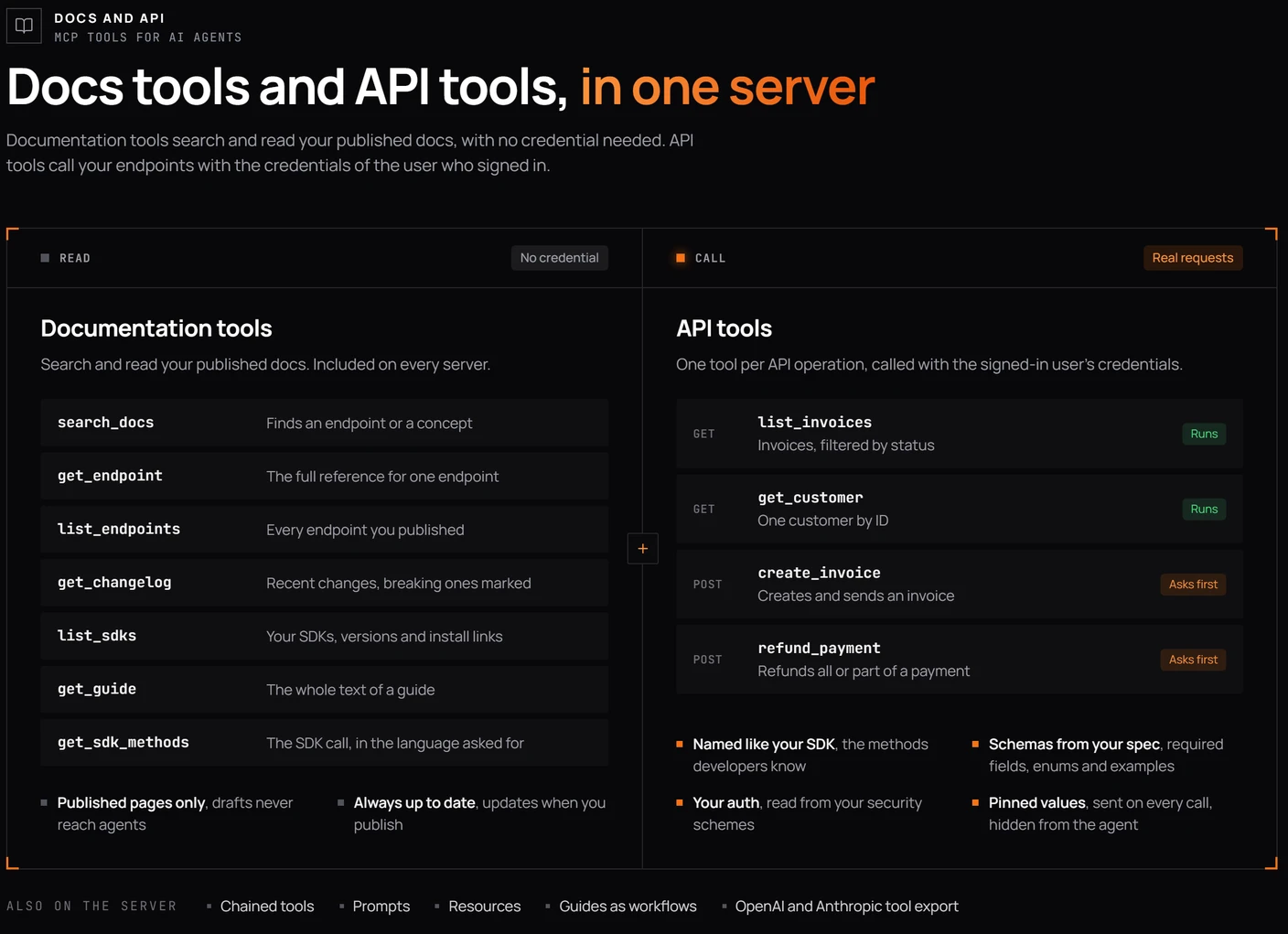
A useful way to start is with one narrow workflow. “Find a customer's latest invoice” is a clearer design target than “make every billing operation available to agents.” You can expand once the model reliably selects the right tool and the authorization checks are tested.
Is MCP safe?
MCP is an interface, not a guarantee that every server is trustworthy. A server may be poorly configured, malicious, or simply too powerful for the task. Remote authorization and local process permissions determine what it can access. Tool results and metadata can also carry prompt-injection attempts.
Review the publisher, scopes and actions before connecting. Use least privilege, explicit approval for consequential writes, and server-side validation of every operation. For a production service, add rate limits, audit logs and controls on outbound requests.
Connecting a server
For a local development server, a supported client such as Claude Code can launch it through a command. For a remote server, the client typically needs an HTTPS URL and may need an OAuth sign-in flow. Follow the setup instructions for the exact client, because configuration files and authentication mechanisms differ.
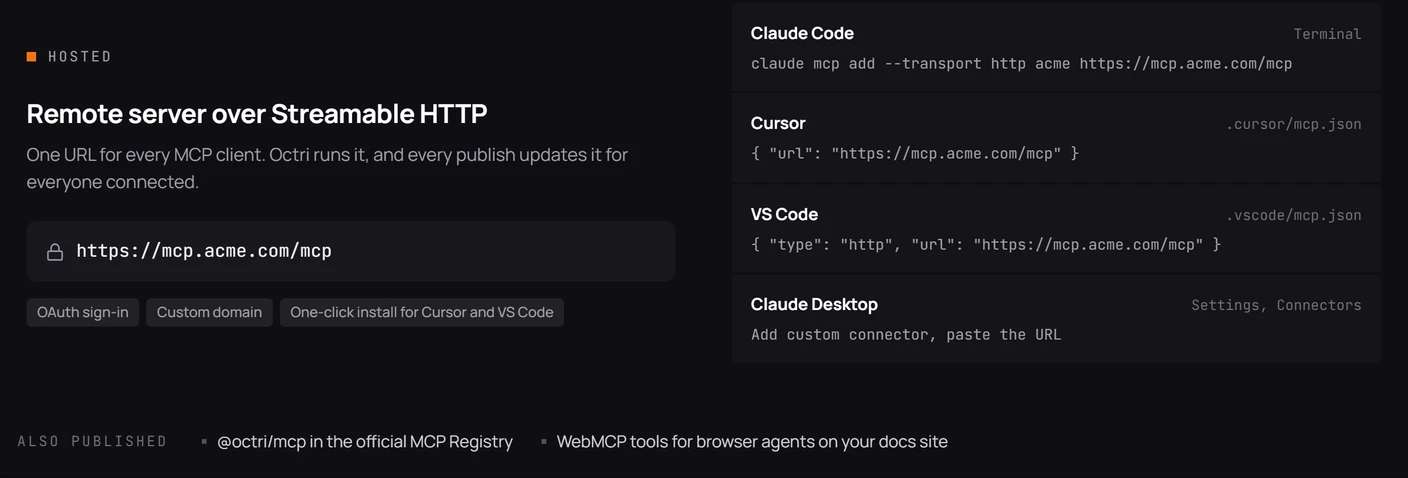
Test a harmless read-only tool first. Confirm the tool names the model sees and the result it receives. If setup fails, determine whether the failure occurs while starting the process, connecting to the endpoint, authenticating the caller or executing the tool. Those are separate problems with different fixes.
Checklist before you connect an MCP server
Verify who publishes the server, where it runs, which tools it exposes, what credentials it receives and whether those credentials can be revoked. Inspect the requested permissions and the behavior of write approvals. Confirm client and protocol compatibility, and avoid letting a third-party package access files or systems unrelated to the task.
When the connection works, keep its authority as small as you can. Expanding access later is easier than recovering from an action no one meant to authorize.
MCP servers with Octri
Octri MCP Studio can turn an existing OpenAPI definition into an MCP tool surface, allowing compatible AI applications to discover and invoke selected API operations. Documentation, SDKs and MCP tools can then share the same underlying contract while serving different kinds of callers.
Generated tools still need human decisions about names, grouping, permissions and approval. MCP standardizes the connection; good developer experience depends on what you choose to expose through it.