By the Octri team · Updated
MCP vs API: what is the difference and when to use each
A developer knows precisely which API call their application is going to make. They choose the endpoint, write the request, and decide what happens when it fails. An agent is a different kind of caller. It starts with a request such as “find the missing order” and has to choose among the capabilities its host offers. That difference affects the interface you design, even when both paths ultimately reach the same database.
The MCP vs API comparison is easiest to understand by following a single request and seeing who makes each decision.
MCP vs API: what is the difference?
A REST API describes operations using URLs, methods, headers and bodies. The consuming program makes a predetermined call. An MCP server advertises tools using names, descriptions and argument schemas, so an AI application can present those tools to a model and execute the calls it selects.
They usually coexist. An MCP server may translate get_order(order_id="o-2") into GET /v1/orders/o-2. The underlying API still owns data, permissions and business rules. MCP adds a model-facing discovery and execution interface.
| Concern | REST API | MCP server |
|---|---|---|
| Selecting an action | Developer's application code | Model, through its host application |
| Discovering operations | Human docs and OpenAPI | tools/list with schemas and descriptions |
| Calling an action | HTTP route and method | tools/call sent to the MCP server |
| Ordinary failure | HTTP status and response body | Often a tool result marked isError |
| Authentication | API's own mechanism | MCP server checks the caller; upstream API has separate credentials |
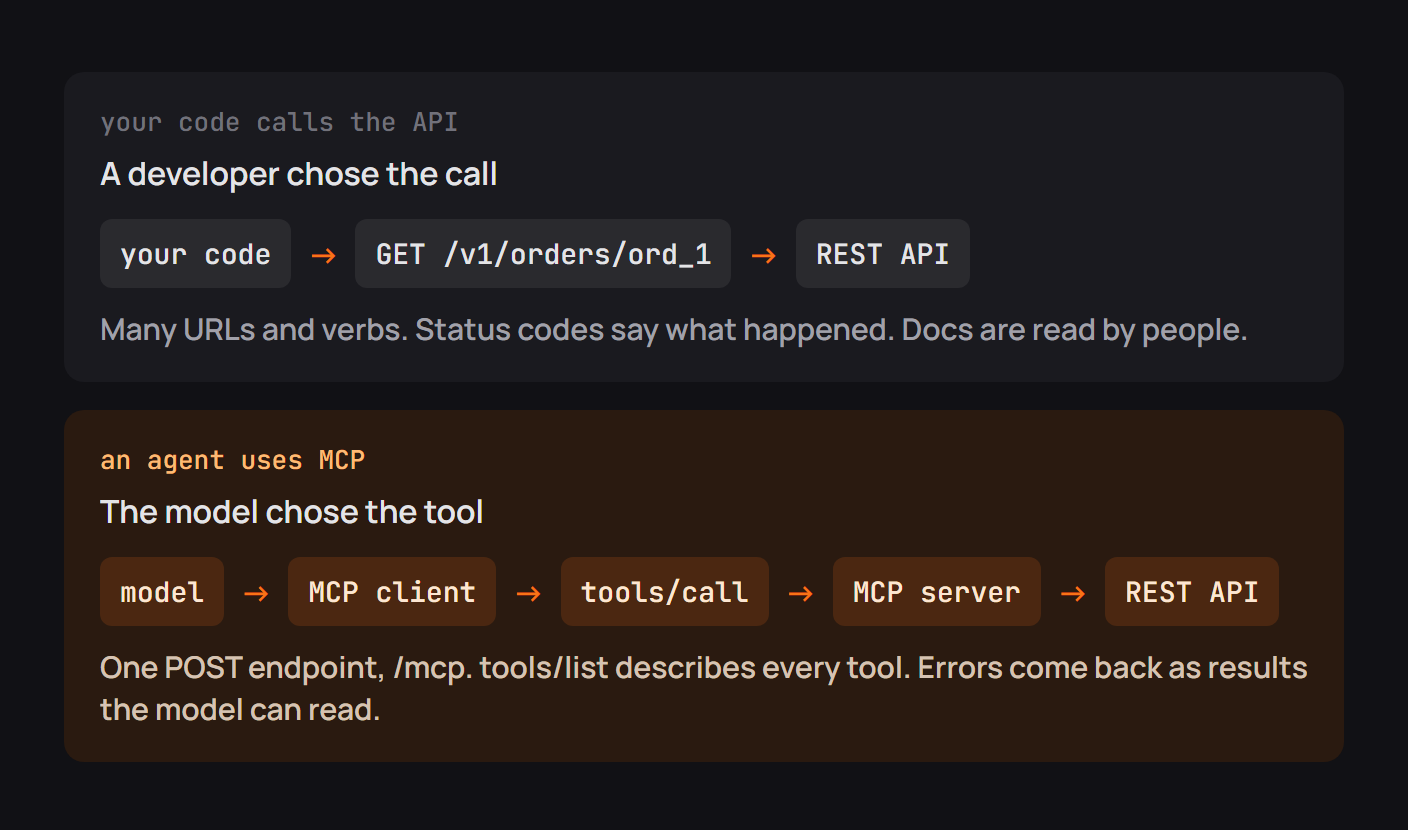
The same lookup as an API and as an MCP tool
I tested the simplest version of this distinction locally. A small Python HTTP server returned 404 for /orders/nope. The wrapper representing an MCP tool returned isError: true with the explanation that the order did not exist and another tool could list valid IDs. The result describes the same missing object, but it is shaped for a different caller.
That test used a real local HTTP request and a simulated tool-result structure; it did not run an MCP transport. The distinction remains useful: an MCP tool can turn an upstream 404 into a domain-specific instruction the model can act on.
# Application-side behavior used by a tool wrapper

def get_order_tool(order_id: str):
    response = orders_api.get(f"/orders/{order_id}")
    if response.status_code == 404:
        return {
            "isError": True,
            "message": "No such order. Use list_orders to find its ID.",
        }
    response.raise_for_status()
    return {"isError": False, "order": response.json()}
A real MCP SDK wraps that outcome in the protocol's tool-result format. Other failures, such as invalid authentication, may need to stop at the HTTP layer instead. Don't indiscriminately convert every upstream error into a successful-looking response.
What MCP adds over plain HTTP
The useful addition is discovery at run time. An agent can ask what is available and receive a contract without a developer writing a separate integration for every model host. Names and descriptions are then part of the behavior: they influence which tool is called and which arguments are supplied.
That also creates editorial work. An OpenAPI operation named postV1OrdersById may be clear enough to a code generator but poor as a model-facing tool. cancel_pending_order, with a warning that shipped orders cannot be cancelled, tells the model when it belongs in a workflow.
MCP can also expose resources or prompts. Most production conversations focus on tools because they cause actions. That makes access controls at the MCP layer especially important.
The tool list costs context
An API can have thousands of operations without showing all of them to a running model. A naive MCP wrapper that lists every operation puts descriptions and schemas into the model's context. A single deeply nested schema can consume more tokens than many small tools combined.
There are alternatives: expose a curated list, group tools by job, offer search for tools, or let an agent execute controlled SDK code. Which works best depends on the model and task. Count the serialized tool definitions with the tokenizer you actually deploy, and evaluate whether the model selects correctly.
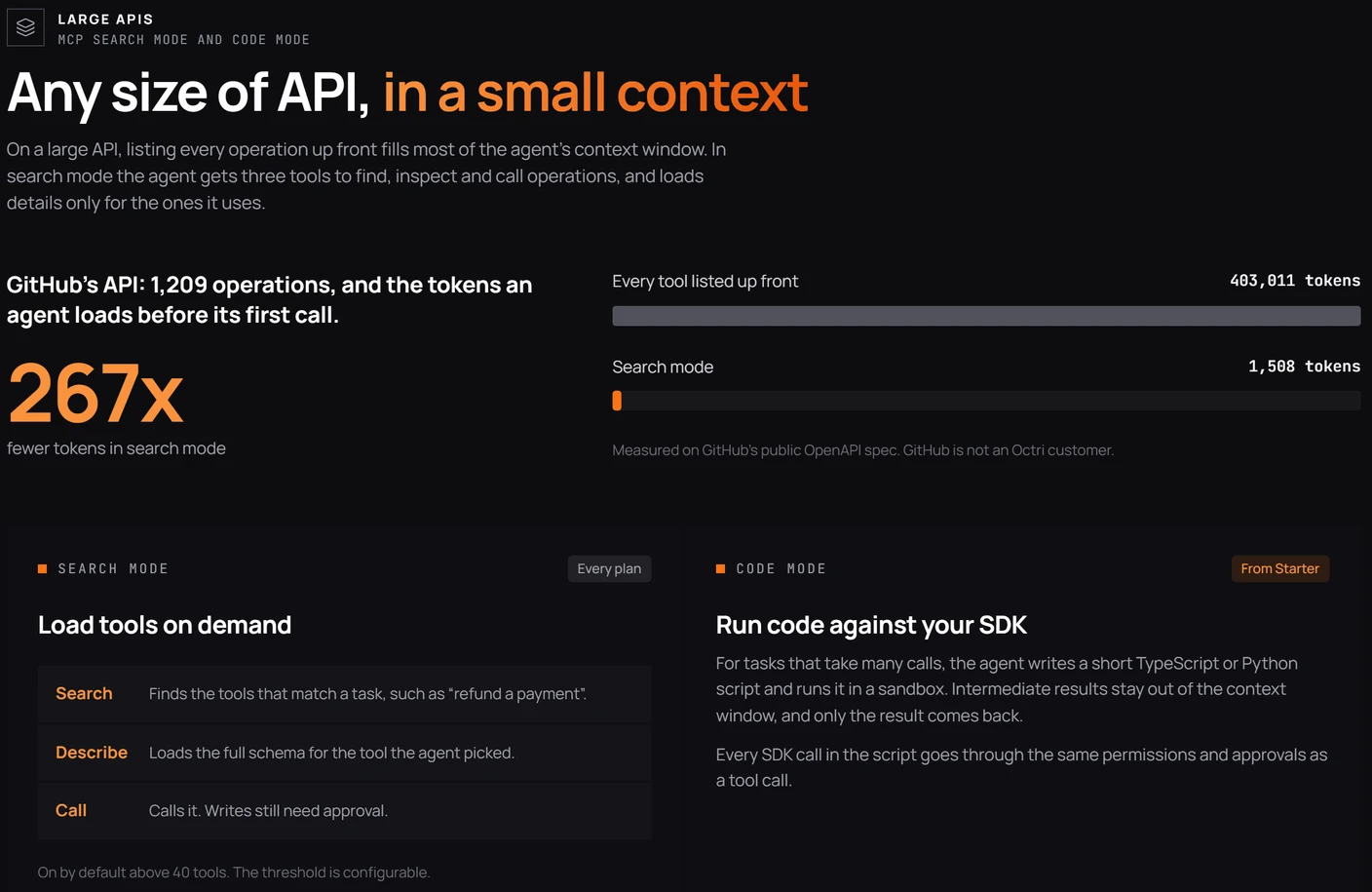
Who decides what runs
In an API integration, the application code determines the endpoint and has whatever permissions the developer provisioned. In an MCP workflow, the model proposes an action but the host and server still have responsibility for deciding whether it may happen.
Never treat “the model chose this tool” as authorization. Validate the caller's identity, the operation's scope and the request arguments server-side. For writes, make approval meaningful by showing the exact action, not only the tool's friendly name.
A read-only hint can assist a client, but hints are not a security boundary. An unsafe write should fail even if a client skips a confirmation screen.
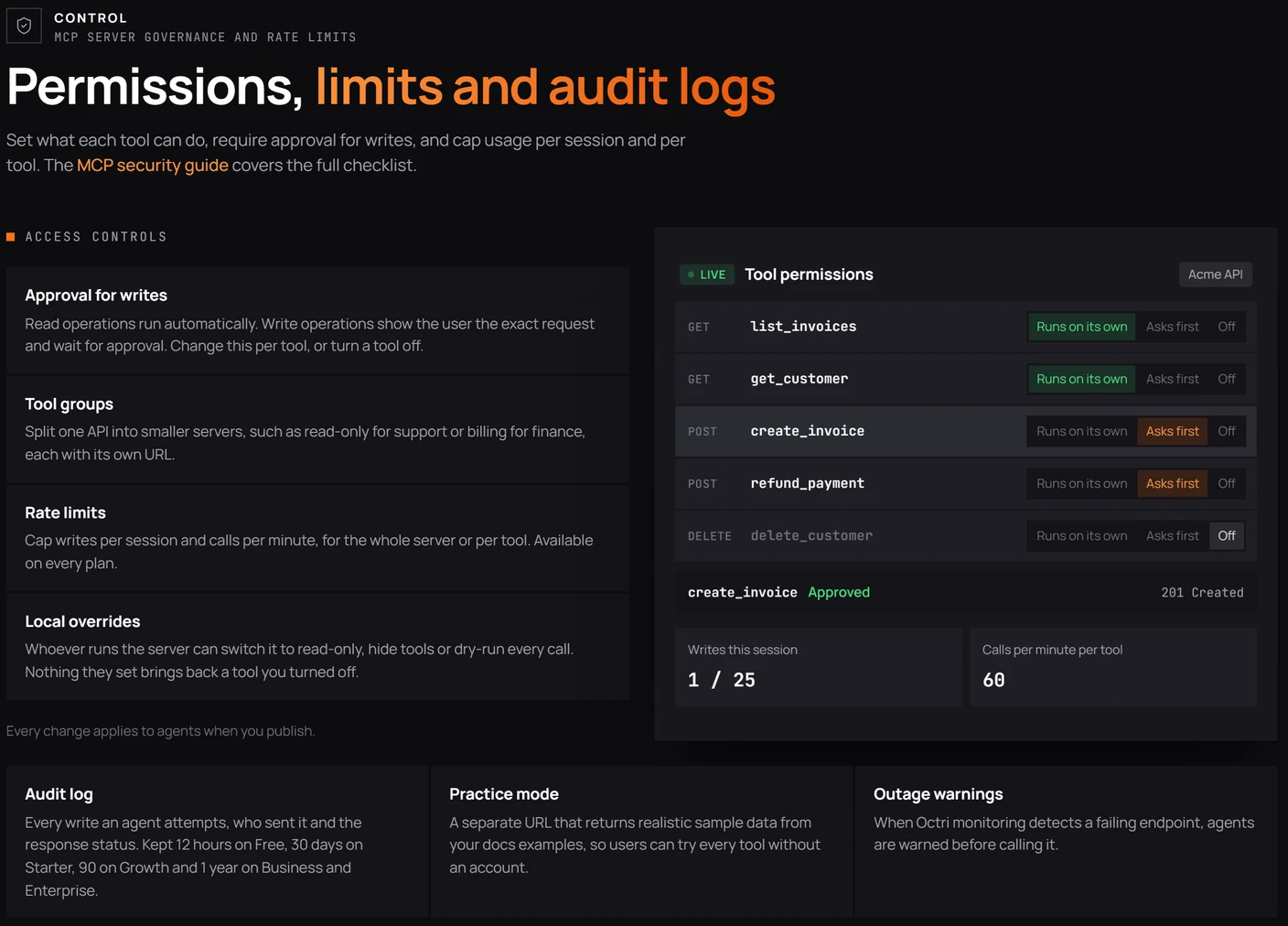
When to use an API, MCP or both
Use a direct API or SDK when application code needs deterministic calls, typed integration, retries and predictable error handling. Use MCP when an AI agent needs to discover capabilities and choose among them during a conversation or workflow. Most developer platforms with agent use cases will want both interfaces on the same underlying service.
A useful design question is whether you are serving code that already knows what to do or a model deciding what to do next. That distinction guides descriptions, safeguards and testing more than the transport itself.
Checklist before you put MCP in front of an API
Confirm which operations should be exposed, give them action-oriented names, make argument schemas precise, translate recoverable errors carefully, and separate MCP authorization from upstream credentials. Measure context cost, audit tool changes and test real model behavior. Keep the API as the authoritative system for permissions, validation and state changes.
If the MCP layer fails, the API should remain correct. That is a better security model than trusting the agent to call everything properly.
MCP and your API with Octri
Octri MCP Studio can create an agent-facing layer from an OpenAPI specification while the underlying endpoints remain available to applications and generated SDKs. This is useful when you need both deterministic integrations and model-selected actions without maintaining two unrelated definitions of the API.
The generated tool list still deserves curation. Decide which tools the model should see, how it learns to choose them, and which writes require approval. Those decisions determine whether the MCP surface is genuinely useful or merely complete.