By the Octri team · Updated
MCP server examples: 22 real servers, measured and compared
The easiest way to understand MCP servers is to look at a few that solve different problems. A filesystem server should behave differently from a company account integration. A documentation server can be useful with only two search tools. A server generated from a large OpenAPI document may expose hundreds of operations and still give an agent a poor experience.
These MCP server examples are worth studying for their design choices, not as a leaderboard. Tool lists and authentication requirements change, so verify the live server before installing it or quoting exact tool counts. The comparison notes assembled for this topic checked 22 endpoints on November 12, 2026: six public documentation servers, fourteen company servers that required sign-in, and two generated practice servers. The figures below are that dated snapshot, not a fresh uptime test.
What are some examples of MCP servers?
You can group most examples by the job they perform. Reference servers are small and educational. Documentation servers search a public corpus. Account-connected servers act on private data after sign-in. Generated servers map an existing API to tools. Each category is useful, but each has a different security and context budget.
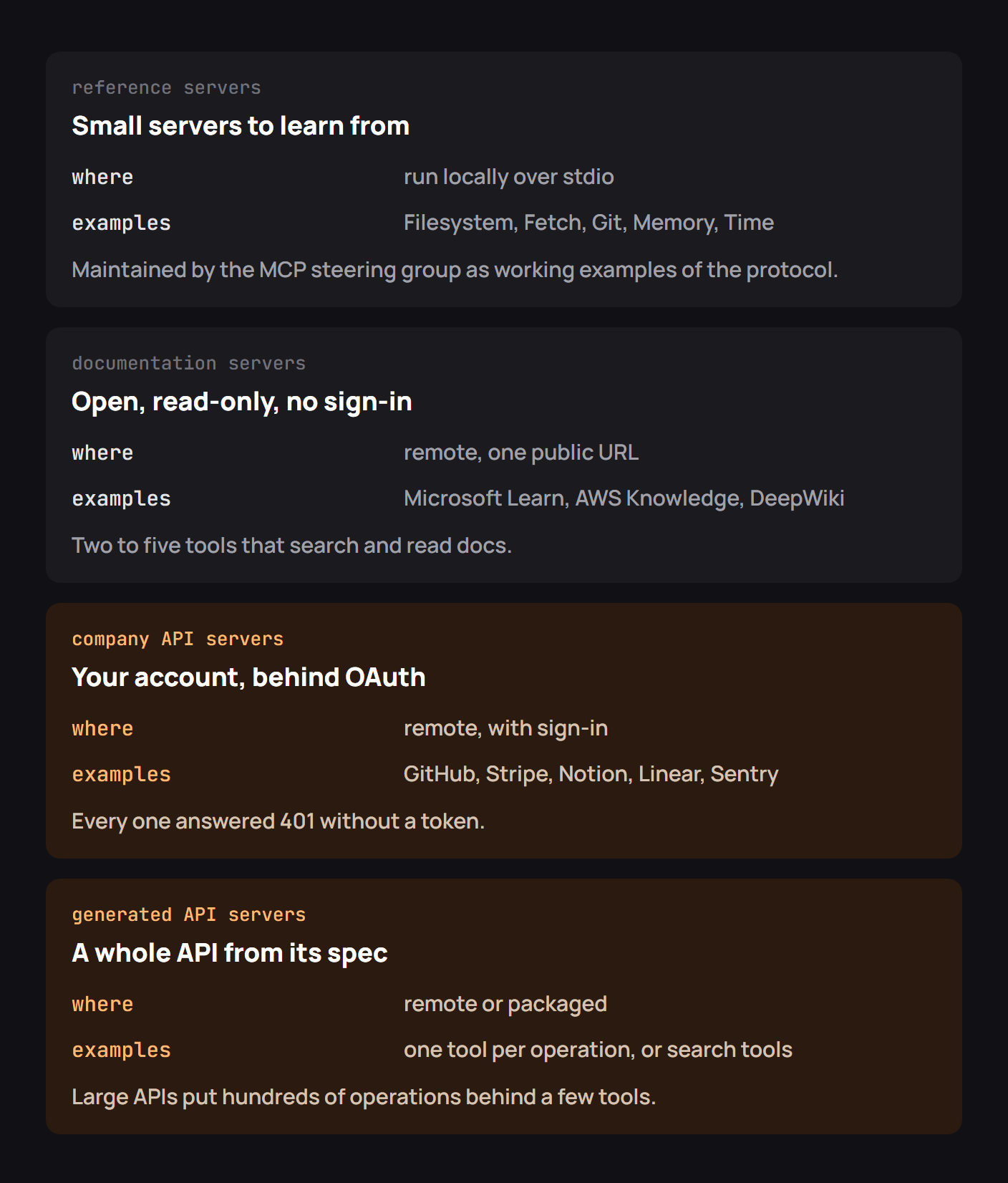
The choice of examples should match your next decision. If you're learning how to register one tool, read a tiny reference server. If you're designing an agent integration for paying customers, study permission scopes, OAuth and the way a production service limits its tool catalog.
Reference servers to learn from
The MCP project's servers repository contains small, inspectable implementations. Filesystem is useful for understanding allowlisted folders. Git shows how a server wraps an existing command-line interface. Fetch demonstrates converting outside content into model-readable text. An “everything” example is helpful when you need to inspect protocol features in one place.
Run reference servers against disposable data. A filesystem tool that writes in an allowed directory can still destroy files in that directory. The fact that a server comes from an educational repository does not mean its default authority is appropriate for your main workstation.
For a first exercise, inspect only tools/list: which tools are exposed, which arguments are required, and whether a description tells the model when to choose one. Reading the contract usually teaches more than asking an assistant to call everything at once.
Documentation servers anyone can connect to
Documentation servers are a strong design model because the operations are naturally narrow. A tool searches for relevant pages, another reads a page, and sometimes a third fetches a small example. Microsoft Learn, Cloudflare documentation, AWS Knowledge and DeepWiki have offered public MCP endpoints for this kind of workflow.
The important comparison is not how many tools a server has. It is whether a search result gives the agent enough provenance to decide which page to read next, and whether the read result includes a stable URL and the version it describes.
The November 12 comparison recorded the following public servers and tool-list sizes. The token numbers use the tokenizer specified in those notes, so treat them as indicative rather than a universal cost for every model.
| Server | Endpoint | Tools | Reported tool-list tokens |
|---|---|---|---|
| DeepWiki | https://mcp.deepwiki.com/mcp |
3 | 487 |
| Cloudflare Docs | https://docs.mcp.cloudflare.com/mcp |
2 | 473 |
| Microsoft Learn | https://learn.microsoft.com/api/mcp |
3 | 1,095 |
| AWS Knowledge | https://knowledge-mcp.global.api.aws |
5 | 2,082 |
| Context7 | https://mcp.context7.com/mcp |
2 | 1,200 |
| Hugging Face | https://huggingface.co/mcp |
4 | 6,152 |
A tiny tool catalog also protects context. A model that sees two well-described tools has less to sort through than one presented with hundreds of almost identical get... operations. Use that observation when deciding whether a new documentation capability really needs its own tool.
Company servers behind sign-in
GitHub, Notion, Stripe and other service providers have exposed account-connected MCP servers. Those tools need more than a public endpoint: they must identify the person, verify permissions and make it clear when an action changes external state. An unauthenticated request may correctly receive 401 rather than a tool list.
One of the best firsthand accounts comes from Notion engineer Kenneth Sinder. In Notion's July 2025 account of building a hosted MCP server, he described an early downloadable server that mapped public API endpoints one-to-one to MCP tools. It was technically useful, but installation demanded too much from ordinary users, and the huge JSON-oriented surface consumed context inefficiently. The team later moved toward hosted OAuth and tools designed around agent tasks, including page operations expressed more naturally for a model.
That experience is valuable because it separates two kinds of success. The first server proved that existing APIs could be exposed through MCP. User feedback showed that exposure alone wasn't enough: setup and the shape of the tools determined whether agents could actually help.
The same snapshot checked fourteen services that manage account data. All fourteen returned an authentication challenge without a token, which is expected behavior for private tools. These are the providers in that check, not a list of services that can currently be used without setup:
| Server | Recorded MCP URL | Server | Recorded MCP URL |
|---|---|---|---|
| GitHub | https://api.githubcopilot.com/mcp/ |
Stripe | https://mcp.stripe.com |
| Notion | https://mcp.notion.com/mcp |
Linear | https://mcp.linear.app/mcp |
| Sentry | https://mcp.sentry.dev/mcp |
PayPal | https://mcp.paypal.com/mcp |
| Asana | https://mcp.asana.com/v2/mcp |
Canva | https://mcp.canva.com/mcp |
| Figma | https://mcp.figma.com/mcp |
Vercel | https://mcp.vercel.com |
| Supabase | https://mcp.supabase.com/mcp |
Neon | https://mcp.neon.tech/mcp |
| HubSpot | https://mcp.hubspot.com |
Atlassian | https://mcp.atlassian.com/v1/mcp |
Generated servers for whole APIs
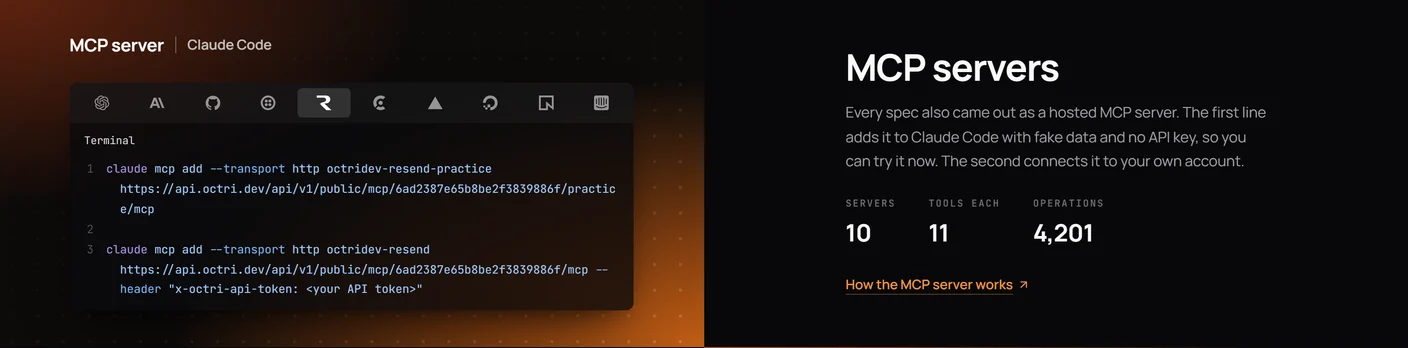
An OpenAPI generator can turn operations into tools with little manual wiring. That is an excellent starting point when the API already has descriptions, request schemas and a maintained security model. But large APIs often need curation: short tool lists per job, names that communicate intent, and constraints that prevent the model from choosing an administrative operation when it only needs a lookup.
The two generated Octri practice endpoints included in the November 12 comparison had very different-sized source APIs behind short tool lists:
| Practice server | OpenAPI operations represented | MCP tools | Reported tool-list tokens |
|---|---|---|---|
| GitHub API showcase | 1,242 | 12 | 2,103 |
| OpenAI API showcase | 360 | 12 | 2,099 |
These measurements describe the practice endpoints available in that snapshot; they are not counts of GitHub's or OpenAI's official MCP services. The short list uses discovery tools so an agent can find a relevant operation before requesting its full schema. That reduces initial context cost, but search relevance still matters: an answer can be in the catalog and yet rank too low to be found easily.
Notion's experience is a useful counterexample to the idea that more generated tools are automatically better. Its team kept API-backed functionality while creating agent-friendly operations where the direct API shape was awkward. The lesson is not to discard generation, but to use it as a foundation rather than the entire product design.
Finding more servers
The official MCP Registry and providers' own developer documentation are better starting points than an unmaintained “top 100” post. Look for an owner you recognize, a maintained repository or published endpoint, a security policy and clear setup instructions. Before connecting a server, inspect exactly which permissions it requests.
A repository with many stars is not a security review. Check recent releases, open issues, dependency updates and the origin of the server package. For remote services, prefer the provider's documented URL to a third-party proxy that asks for your account token.
What the best examples have in common
Good MCP servers make an agent's next step obvious. Names explain actions, arguments have examples, failures include recovery information, and access is limited to what a user actually approved. Their tool lists are shaped around tasks, not the provider's entire internal object model.
A server can also be intentionally small. A two-tool docs server may be more usable than a hundred-tool admin server. Measure tool-selection quality and token cost with representative tasks rather than treating the number of tools as a feature count.
Checklist for choosing an MCP server
Identify the publisher, verify the endpoint or package, review requested scopes, inspect the tool descriptions, and try harmless read-only tasks first. For writes, check how approval, audit logs, rate limits and revocation work. Prefer a server whose failure messages tell you what went wrong and whose release history shows when the tool contract changes.
If you would not give a script the same permissions, you should not give them to an agent merely because the interface is conversational.
MCP server examples from Octri
Octri MCP Studio can generate API-backed MCP servers and let you shape the exposed tool set. Its tool groups can make a large API behave more like the focused examples above, with separate sets for support, operations or read-only investigation.
The most useful examples to copy are the ones that help you decide what to leave out. A tool omitted from an agent's catalog cannot be selected by mistake, even though the underlying API remains available to your normal applications.