Does a Green Build Mean the Code Works?
A passing CI run is useful evidence, but its meaning depends on the checks that ran, the environment they ran in, and the results they reused.
Continuous integration is supposed to make a common engineering decision easier: is this change ready to merge?
A pull request goes green. The tests passed, the linter found no problems, and the application built successfully. It seems reasonable to merge. But what happens when the application fails on startup because a dependency is missing? Or when an important check was skipped entirely?
These failures don't necessarily mean the CI system malfunctioned. Often, the pipeline did exactly what it was configured to do. The trouble comes from assuming its result establishes something it never tested.
To decide how much confidence a green build deserves, we should first understand what it verifies, where its blind spots come from, and which additional checks are worth running before a release.
What Does a Green Build Verify?
A green build means that a CI workflow reached its configured success state for a particular revision, using a particular configuration and execution environment.
That is a useful result, but its scope depends on the work performed. A passing unit test establishes that its assertions held for the inputs it exercised. A successful type check establishes that the type checker accepted the code under its configured rules. A successful build establishes that the build tool produced its expected output without reporting a blocking error.
None of those checks, individually, proves that an application will behave correctly in production. Even taken together, they only cover the conditions and behaviors they actually exercise.
There is another complication: a workflow can finish successfully even when some jobs were intentionally skipped or allowed to fail. Before treating green as a release signal, it helps to know which checks contributed evidence and which ones did not.
When a Check Doesn't Run
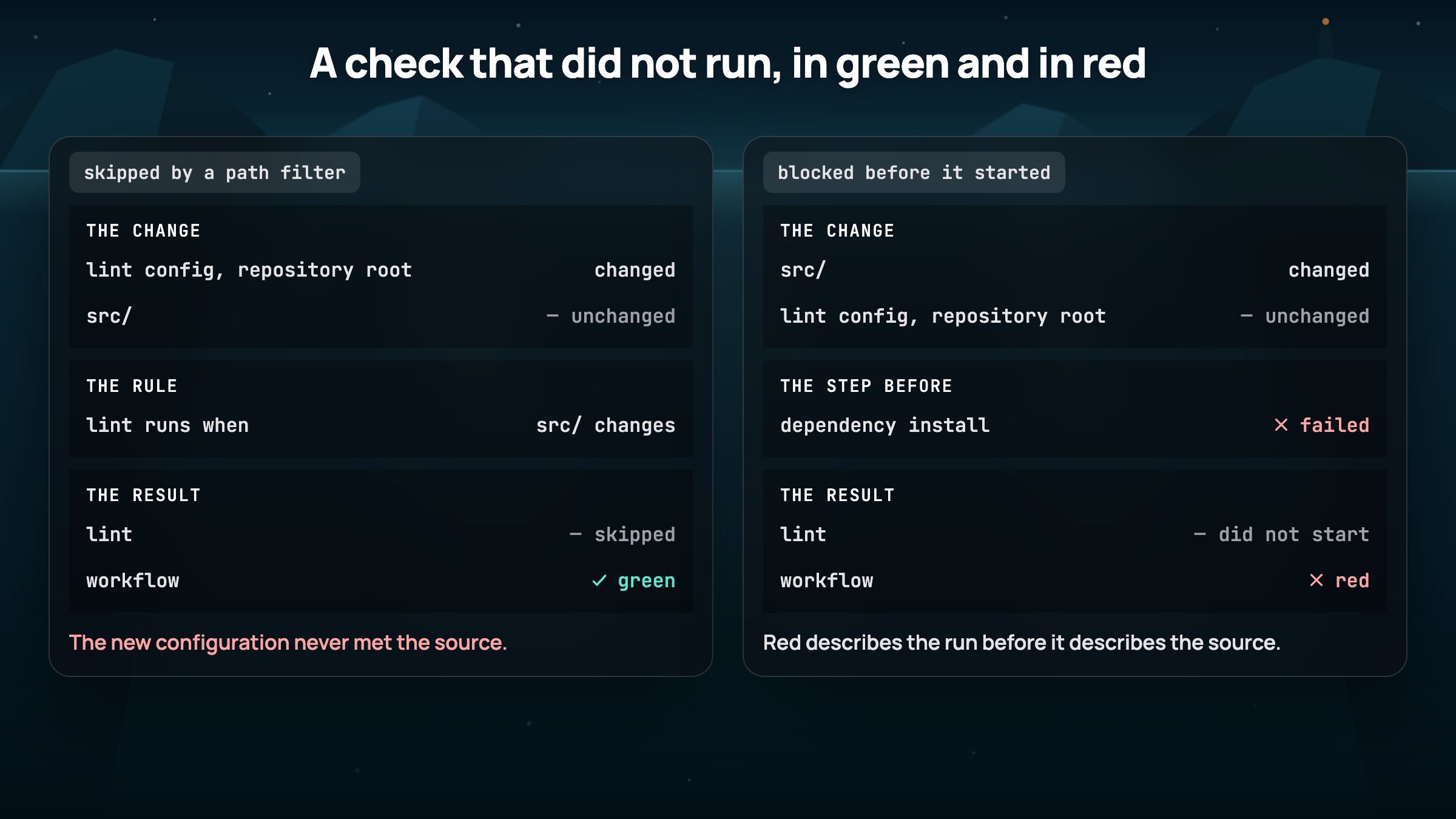
Suppose a repository runs linting only when files under src/ change. That's a sensible way to avoid unnecessary work when someone updates documentation.
Now imagine that the lint configuration lives at the repository root. A change to that file may affect how every source file is checked, but the path filter can still skip linting because nothing under src/ changed.
The workflow stays green. The new configuration was never tested against the source.
Skipped jobs are useful when the skipped work is genuinely unnecessary. The problem is allowing a check required for the change to disappear from the evidence without anyone noticing.
The reverse can happen, too. If a required job cannot start because dependency installation failed, a red result tells us about an execution problem before it tells us anything about the source code. Good CI reporting makes that distinction visible.
When the Environment Hides a Missing Dependency
Consider a Python package with this import:
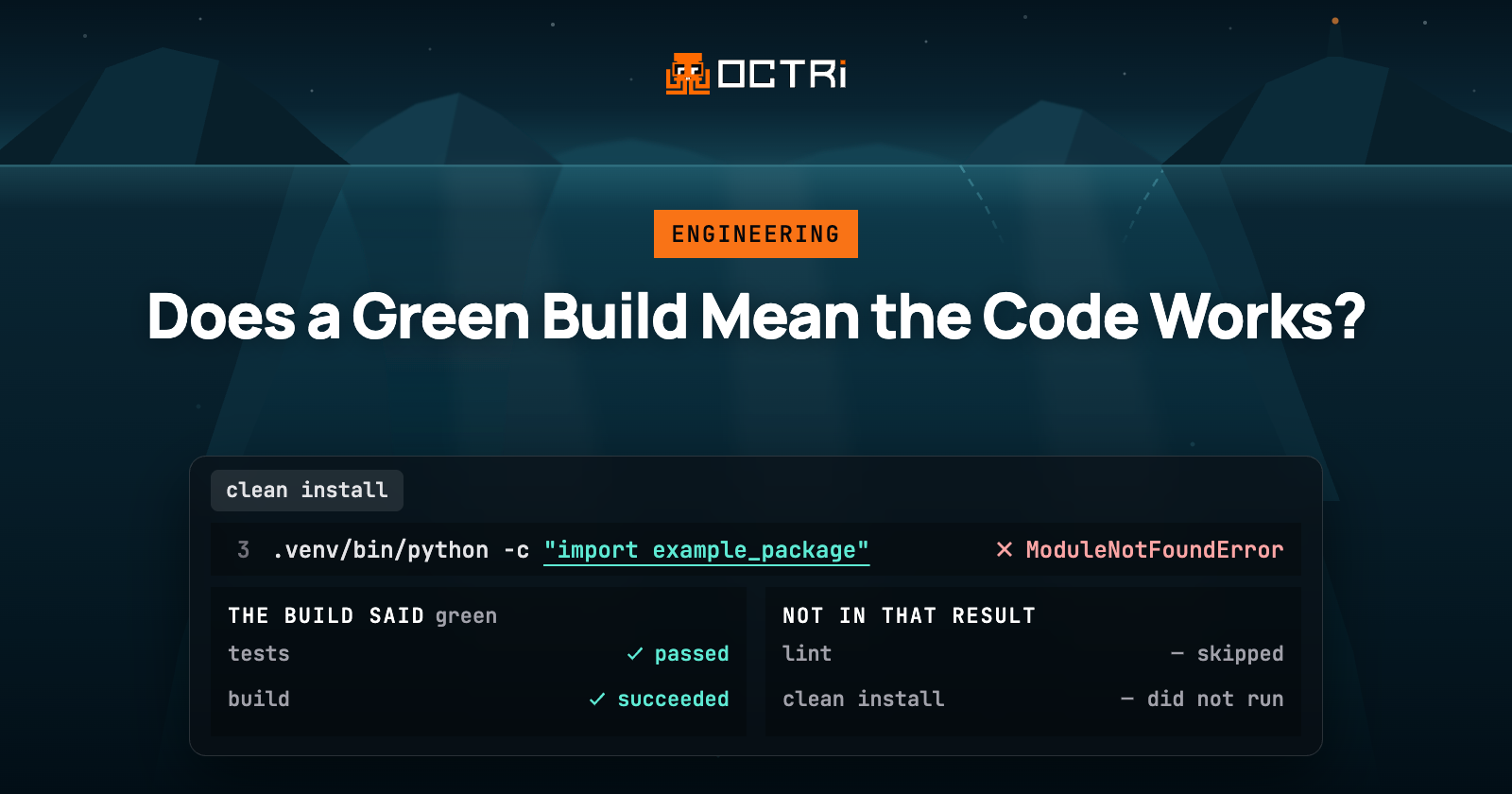
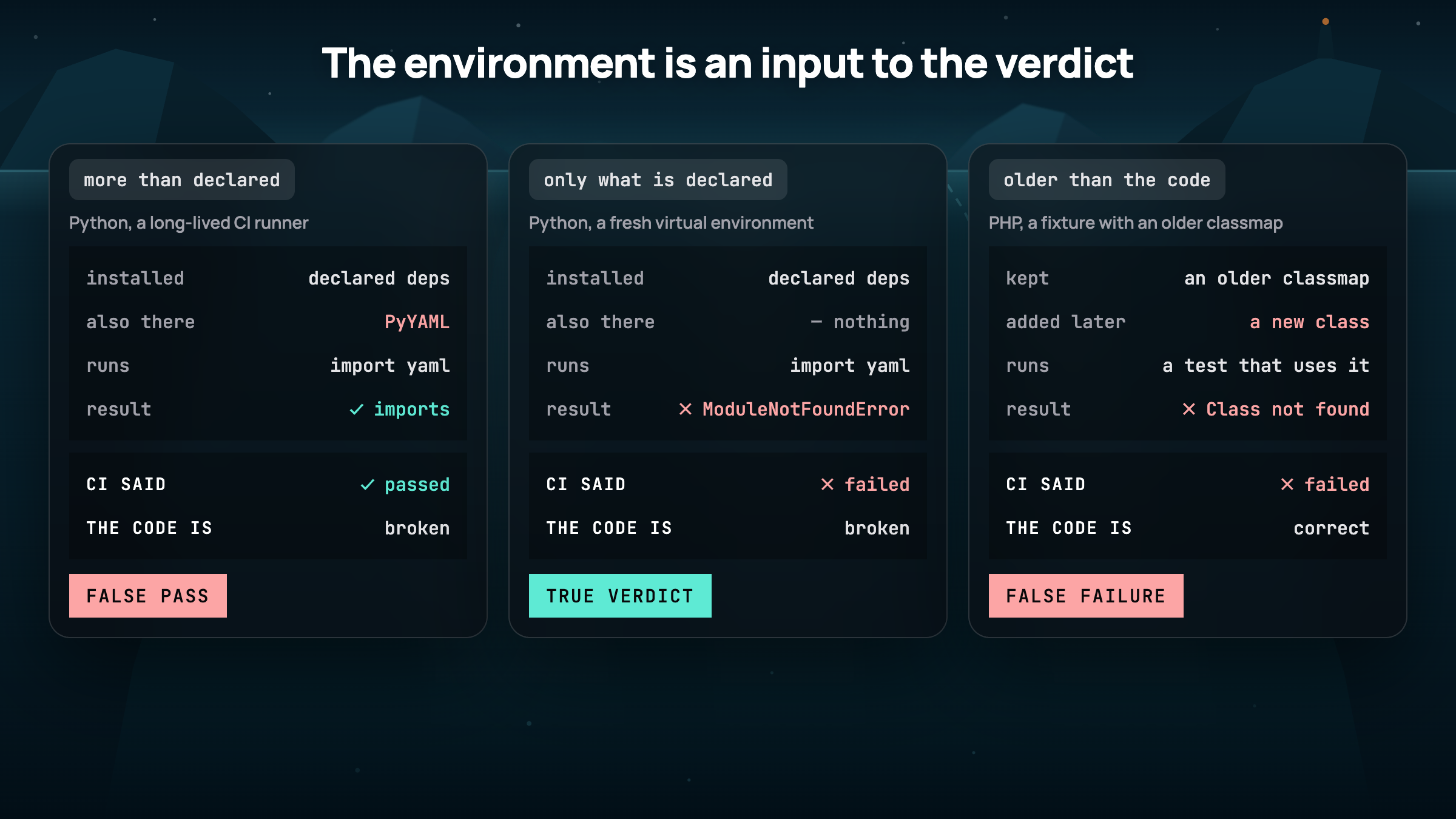
import yamlThe package needs PyYAML, but its dependency manifest doesn't declare it. On a developer machine or a long-lived CI runner, PyYAML might already be installed. Importing the package works there.
A formatter can pass without executing imports. Python bytecode compilation can also succeed, because compiling a module doesn't execute its import statements. If the tests never exercise that import path, every configured check may pass.
Now install the package in a fresh environment. The import fails with ModuleNotFoundError.
The source didn't change between those runs. The available dependencies did.
A clean-install smoke test checks an assumption the earlier pipeline missed. For a Python package, the basic idea looks like this:
python -m venv .venv
.venv/bin/python -m pip install .
.venv/bin/python -c "import example_package"
Here, example_package stands for the package being tested. The important part is that the environment starts without unrelated packages and installs dependencies from the project's own declarations.
This test won't prove every runtime behavior is correct, but it will catch a class of deployment failures that formatting, compilation, and isolated unit tests may never encounter.
When the Environment Contains Stale State
An environment can also make correct code fail.
Composer can generate a classmap that PHP uses to locate classes. If a new class is added while a fixture retains an older classmap, a test may report Class not found even though the class exists in the source. Regenerating the autoloader resolves the problem without changing that source.
Cached compiler output, generated files, and dependency metadata can cause similar failures. In each case, the test is using artifacts created from a previous version of its inputs.
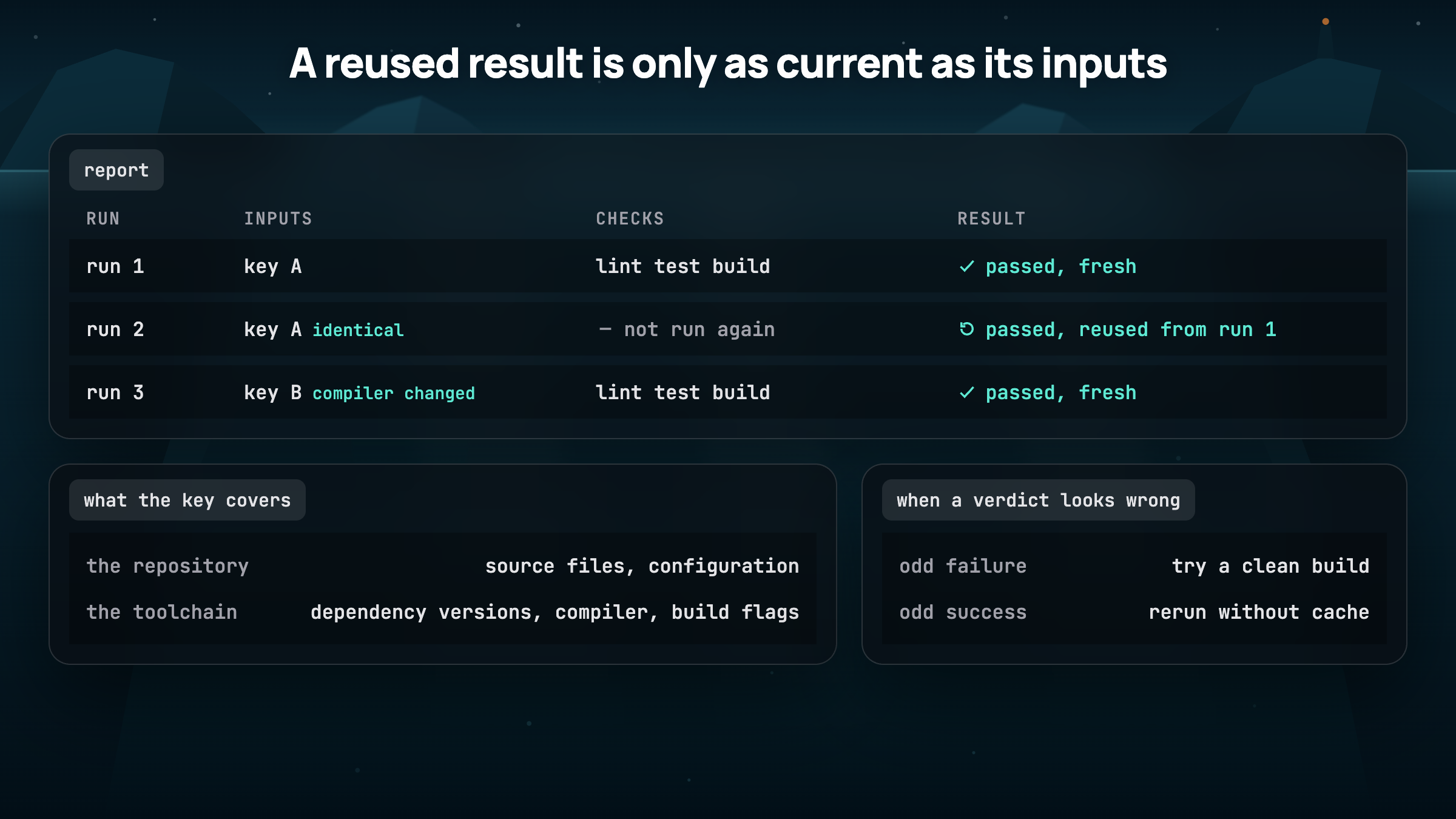
It would be wasteful to rebuild everything from scratch on every commit. Caching saves real time. But the result is only reusable when the inputs that determine it still match. Those inputs may include dependency versions, compiler versions, build flags, and configuration, as well as source files.
If a failure disappears after a clean build, investigate what the previous build reused. If a surprising success depends on a cache, rerun the relevant check without it. Both comparisons help establish whether the verdict belongs to the current code.
Should Every Check Run Every Time?
Usually not. A documentation edit may not need the same verification as a dependency upgrade. A test matrix may contain multiple configurations that produce identical outputs. Repeating all that work can slow feedback without adding meaningful coverage.
The better question is whether the skipped or reused work could change the decision being made. A conditional check should have a clear reason for not running. A cached verdict should depend on all the inputs that can affect it. A report should tell readers when a result was reused rather than presenting it as a fresh execution.
The same reasoning applies to pass counts. Two hundred failures might be one missing prerequisite repeated across a matrix. Two hundred passes might include cached results and jobs that never exercised the behavior being changed. Counts describe the pipeline's outcomes, but they don't tell the whole story of its coverage.
A Practical Green-Build Checklist
Before merging a high-impact change or shipping a release, these are useful rules of thumb:
- Confirm the required checks ran. Inspect conditional, skipped, and non-blocking jobs. Make sure the checks relevant to the change executed on the revision being shipped.
- Review changes to the checks themselves. New test exclusions, lint suppressions, ignored type errors, or changed build flags can weaken what a pass means.
- Test a clean installation. Install from the manifest and lockfile in an isolated environment, then import the package or start the application.
- Rebuild generated artifacts when their inputs change. That includes compiled output, generated source, autoloaders, and dependency metadata.
- Check cache validity. Verify that relevant dependency, toolchain, and configuration changes invalidate reused results. Bypass the cache when a verdict looks suspicious.
- Exercise the artifact you intend to ship. A startup or health-check test against the built artifact can catch problems that source-level checks miss.
These aren't requirements for every trivial change. The point is to choose verification based on the risk of the change and the evidence needed to approve it.
So, Can You Trust a Green Build?
Yes, within the limits of what the pipeline verified.
A good CI system provides fast, repeatable evidence that known problems haven't reappeared. As its checks become more representative of real installation, build, and runtime conditions, that evidence becomes more useful.
Green is a reasonable basis for a decision when you can explain what ran, what was skipped, what was reused, and which important behaviors remain untested. The checkmark is the summary. The engineering confidence comes from the evidence behind it.